If your assistant is giving vague, wrong or unhelpful answers, the instinct is to look at the settings. Almost always, the settings are fine and the knowledge is the problem.
This guide is a diagnostic. Work out which of the five failure modes you have, and the fix follows.
First, find out what it actually used
Before changing anything, open Conversations, find a bad answer, and look at Knowledge used in the right-hand panel.
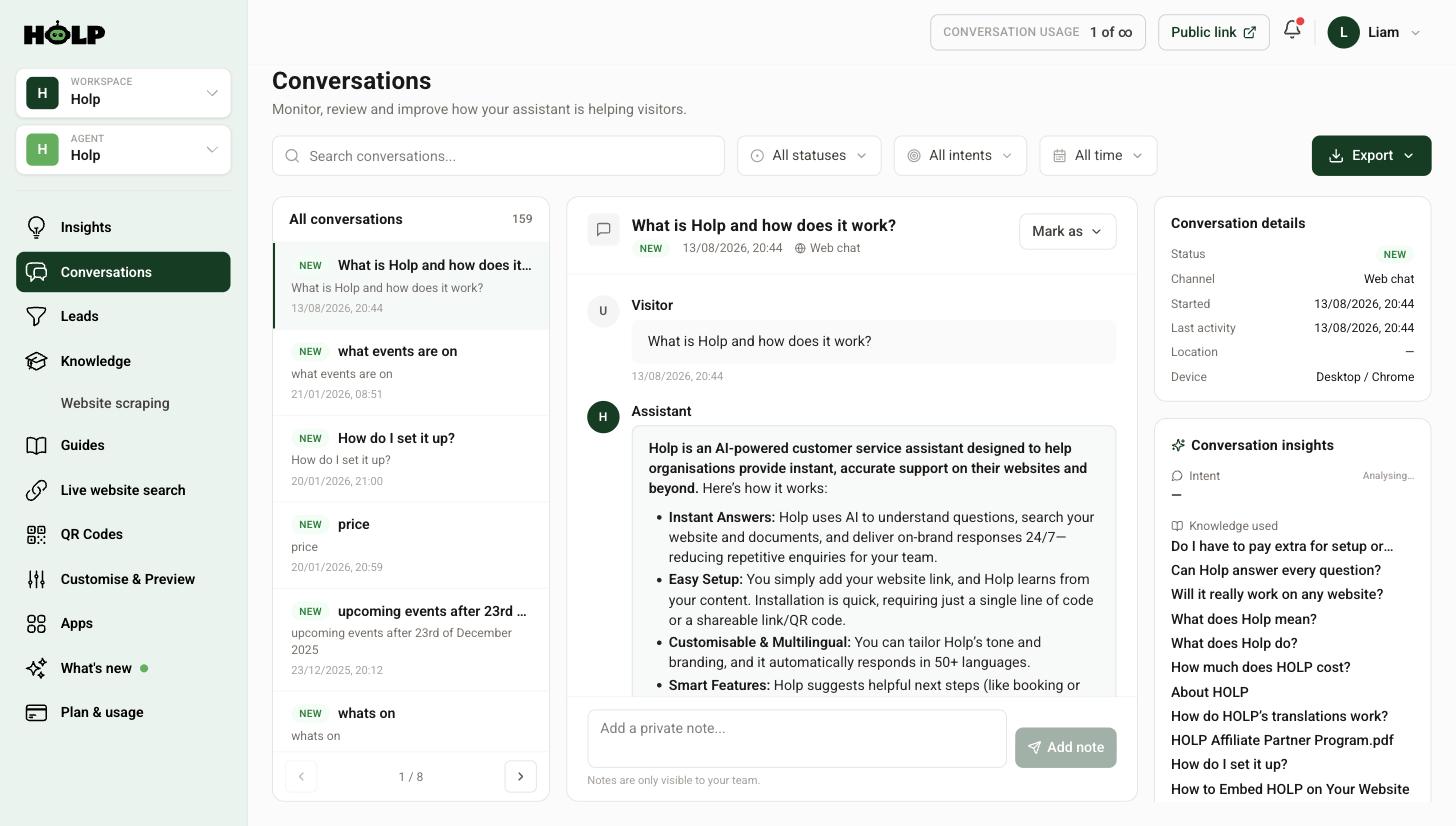
This tells you whether the assistant picked the wrong entry, or picked the right entry and the entry was wrong. Those need completely different fixes, and without this you are guessing.
Problem 1: The answer is vague
You ask about delivery and get something like “delivery times vary depending on your order”.
Cause: the underlying entry is vague. The assistant cannot invent specifics you have not given it.
Fix: open the entry and put the numbers in. Not “we aim to dispatch quickly” but “orders placed before 2pm are dispatched the same working day; delivery takes 2 to 3 working days”. Marketing copy makes vague assistants. Facts make useful ones.
Problem 2: It uses the wrong entry
You ask about refunds and it answers about exchanges.
Cause: two entries look too similar, so the wrong one wins.
Fix: make them more distinct. Sharpen the titles so each is unmistakably about one thing, and give each different keywords. If the two entries genuinely overlap, merge them into one clear entry and delete the other — overlapping entries produce inconsistent answers, which is worse than a single imperfect one.
Problem 3: It says it does not know, but you have written it down
Cause: almost always a vocabulary mismatch. You wrote “concessions”, the visitor asked about “discounts for pensioners”.
Fix: add keywords in the visitor’s words. Read Latest queries on the Insights screen to see the actual language people use, and put those words in.
Also check the entry shows as Indexed on the Knowledge screen. A draft is invisible to the assistant.
Problem 4: The answer is out of date
Cause: an old entry, usually an imported page or an uploaded PDF from a while back.
Fix: sort your Knowledge list by last updated and read the oldest entries. Delete anything about a past event or a discontinued product. For anything that changes constantly, move it to live website search so it reads the current page instead of a copy.
This is worth doing as a quarterly sweep even when nothing appears to be wrong.
Problem 5: The tone is off
The facts are right but it sounds wrong — too formal, too chirpy, too long.
Fix: this one really is a setting. Adjust Brand tone on the Identity tab, or write a custom tone if none of the presets fit. For length and specific habits, add a short rule in additional instructions — something like keeping answers under 100 words unless more detail is asked for.
What good knowledge looks like
The entries that produce good answers share a pattern:
- Titled as a question a customer would ask
- The answer in the first sentence, not the fourth paragraph
- Specific facts — numbers, times, names, conditions
- Short paragraphs and bullet points
- The exceptions included, not left out to keep it tidy
- Keywords covering the other words people use
- One topic each
Build a test set
Write down ten questions you know your customers ask, in their words. Keep the list. Run it after any significant change — new knowledge, a tone change, a model switch, new instructions.
Without a fixed set of questions you will fix one thing and quietly break another, and never notice.
The improvement loop
- Read conversations weekly, especially escalated ones
- Work through knowledge gaps monthly
- Follow up every unhelpful rating — each one names a specific failure
- Re-run your test set after changes
- Sweep the oldest entries quarterly
An assistant that is looked after for three months is a noticeably different product from one that was set up and left. The work is small and the compounding is real.
When it is not the knowledge
Occasionally it genuinely is something else:
- Nobody is using it. Check the conversation count. See why the widget is not showing.
- Answers ignore the page context. Turn on page awareness in the Behaviour tab.
- Instructions are fighting the knowledge. If you have added additional instructions and answers got worse, remove the most recent rule and re-test.
A worked example: tracing one bad answer
A visitor asks a cookware shop whether a particular pan is induction safe. The assistant replies that most of the range works on induction hobs but they should check the product page. Technically true, entirely useless.
The shop opens the conversation and looks at Knowledge used. It shows a general entry called “Our cookware ranges” — a piece of marketing copy imported from the website, full of words like premium and versatile and containing no specifications at all.
So the diagnosis is not that the assistant is bad. It is that the only thing it had to work with was a brochure.
The fix is one entry per range, each listing which hob types it works on, whether it is oven safe and to what temperature, and whether it is dishwasher safe. Dull, factual, and it turns a useless answer into a useful one for every product question that follows.
The general marketing entry gets deleted, because leaving it in means it will keep winning against the specific entries.
Building your ten test questions
A fixed test set is the single most useful thing you can create for maintaining an assistant. Build it like this:
- Take the five most common questions from Latest queries in Insights, in the visitors’ exact words
- Add two questions you know are commercially important — how to buy, how to book
- Add one question you have to say no to
- Add one question the assistant genuinely cannot answer
- Add one deliberately vague question, to test page awareness
Keep them in a document with the answers you got last time. Run them after any significant change. It takes ten minutes and it catches the regressions that otherwise go unnoticed for months.
Knowing when an answer is good enough
Perfect is not the target and chasing it wastes time. A good answer:
- Contains the specific fact the person asked for
- Is correct, including the exceptions
- Sounds like your organisation
- Says what to do next where there is a next step
- Admits it when it does not know
That last point is worth defending internally. An assistant that says it does not know and offers a human is behaving well, not failing. The failure mode to worry about is a confident answer that is wrong — and that is almost always caused by stale or vague knowledge rather than by the assistant.
Where to start if everything feels wrong
If the whole thing seems off rather than one answer, resist the urge to change settings. Do this instead:
- Sort Knowledge by last updated and read the ten oldest entries
- Delete anything about a past event, a discontinued product or an old price
- Delete any entry that is pure marketing copy with no facts in it
- Run your ten test questions
Most assistants that feel unreliable are carrying a few stale, vague entries that keep winning. Removing them changes more than any setting will.
Frequently asked questions
Why does my assistant give vague answers?
Because the entry behind the answer is vague. Replace general statements with specific facts — times, numbers, conditions.
How do I find out which entry produced a bad answer?
Open the conversation and look at Knowledge used in the right-hand panel. It lists the entries the assistant drew on.
My assistant says it does not know something I have written down. Why?
Usually a vocabulary mismatch — the visitor used different words. Add their words as keywords. Also check the entry is Indexed rather than a draft.
Two entries cover similar things and answers are inconsistent. What should I do?
Merge them into one clear entry and delete the other, or sharpen the titles and keywords so each is unmistakably about one topic.
Should I fix answer problems with custom instructions?
Only tone and behaviour problems. If the information is wrong or missing, instructions will not help — fix the knowledge.
How often should I review my knowledge?
Weekly for conversations, monthly for knowledge gaps, quarterly for a sweep of the oldest entries.
What is the single most effective improvement I can make?
Write specific, factual entries titled as the questions customers actually ask, and add keywords in their words rather than yours.
Where to go next
- How to add knowledge to your Holp assistant
- How to find and fix knowledge gaps
- How to review conversations
More from Holp
- Sitemap extractor — check a crawler can find the pages Holp needs to read
- Answerability check — see which customer questions your site cannot answer yet
- All resources — tools, comparisons and platform guides in one place