If your attraction sells tickets, memberships or gift vouchers through DigiTickets, you can connect it to Holp so your assistant answers from live data rather than from whatever was on your website the last time it was read. Ask it whether there are spaces left on Saturday's family tour and it checks DigiTickets there and then, and quotes the real number and the real price.
The connection takes a couple of minutes. You sign in once, then choose from eight switches what your assistant is allowed to do, from answering "what's on?" through to moving a visitor's booking to another date.
What you'll need
- A Holp account, with the assistant you want to connect already set up.
- Your DigiTickets username and password, or an API key from your DigiTickets back office if you'd rather not sign in.
- About five minutes to decide which tools to switch on.
Step 1: Open Apps and find DigiTickets
Choose the assistant you want to connect from the switcher at the top of the left-hand menu, then open Apps. DigiTickets sits under Ticketing & bookings. Click Connect.
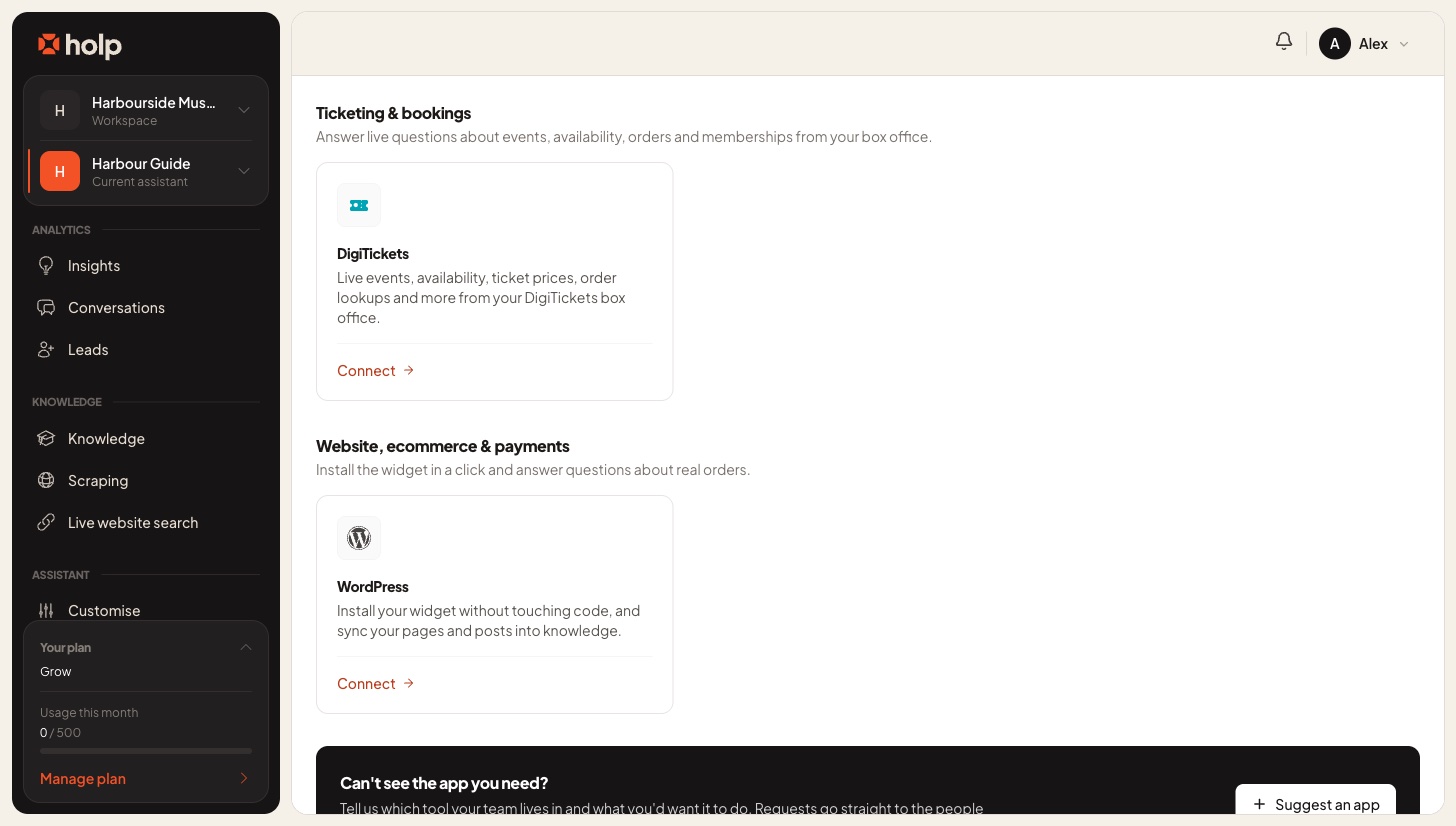
Connections belong to an assistant rather than to the whole workspace, so if you run more than one assistant (say one for the museum and one for the café) you connect each of them separately and give each its own set of tools.
Step 2: Sign in to DigiTickets
Enter your DigiTickets Username and Password, then click Connect DigiTickets.
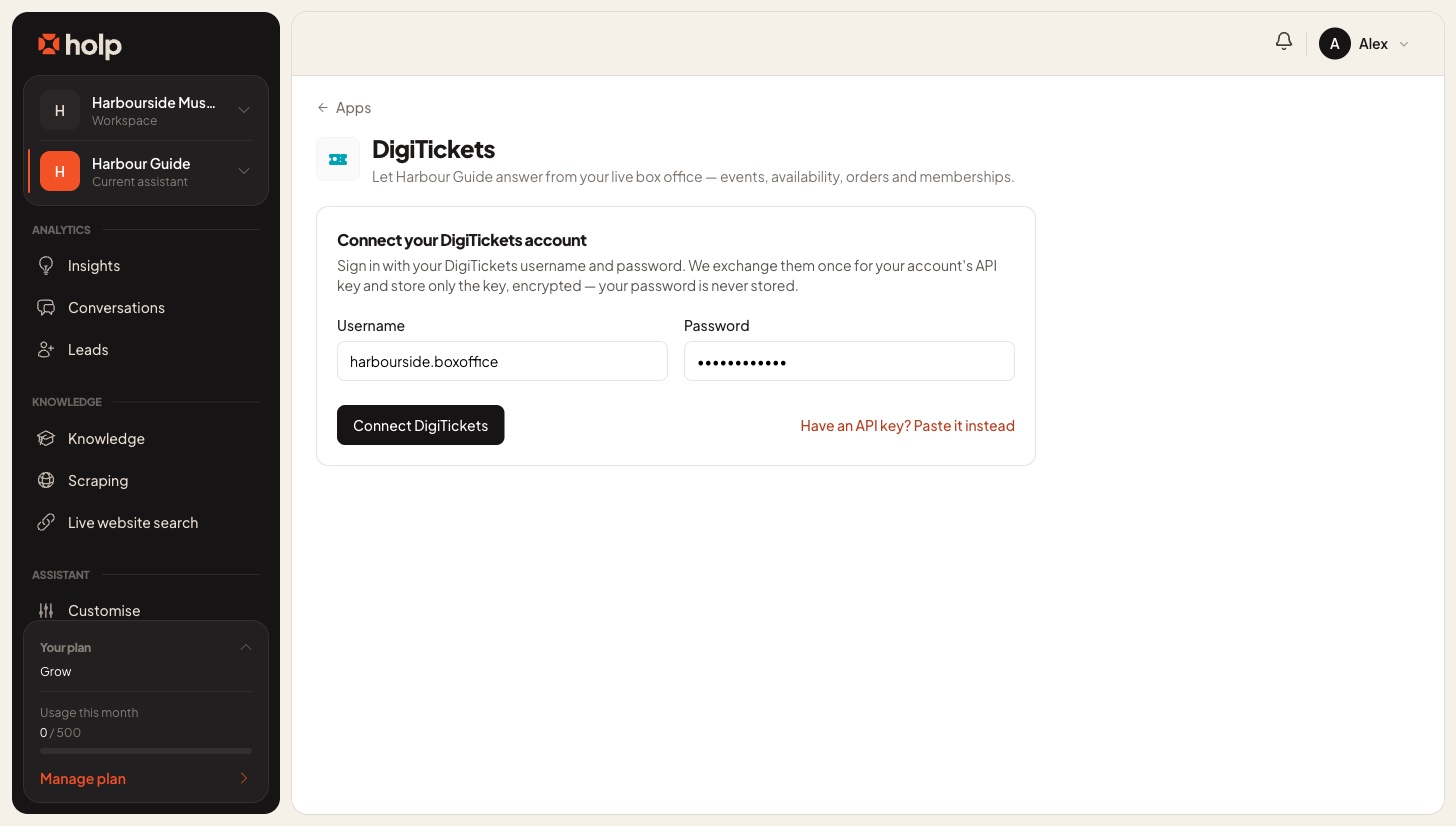
Holp doesn't keep your password. It swaps your username and password with DigiTickets, once, for your account's API key, checks that the key works, and then stores only the key, encrypted. If DigiTickets doesn't accept the details you'll see "DigiTickets did not accept those details" and nothing is saved.
If you already have an API key, or your organisation would rather not share a login, click Have an API key? Paste it instead and paste the key into the field that appears. It's checked against DigiTickets in the same way before it's saved.
Step 3: Choose what your assistant can do
Once you're connected, the page shows your DigiTickets username and the date you connected, with the list of Assistant tools underneath.
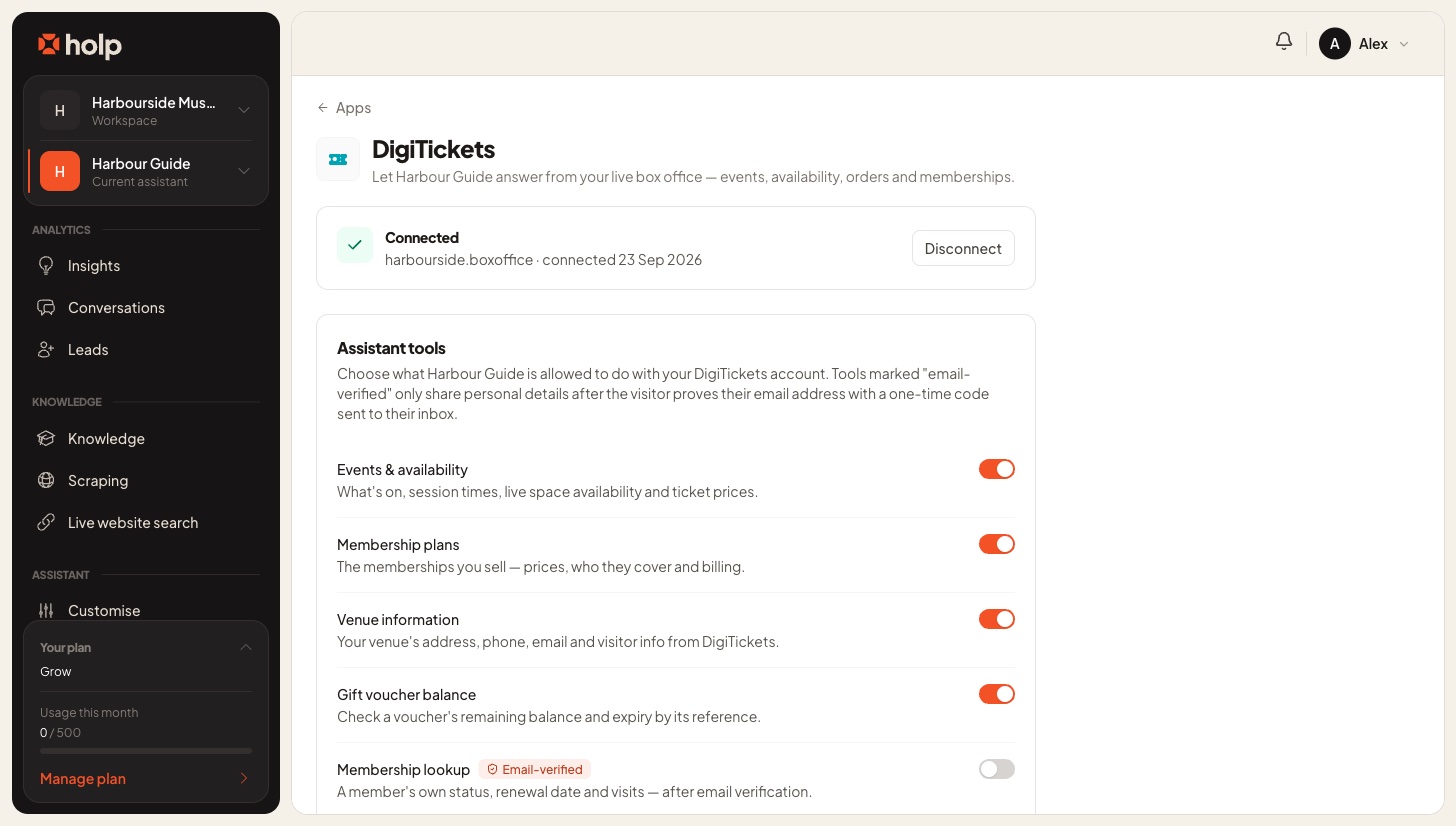
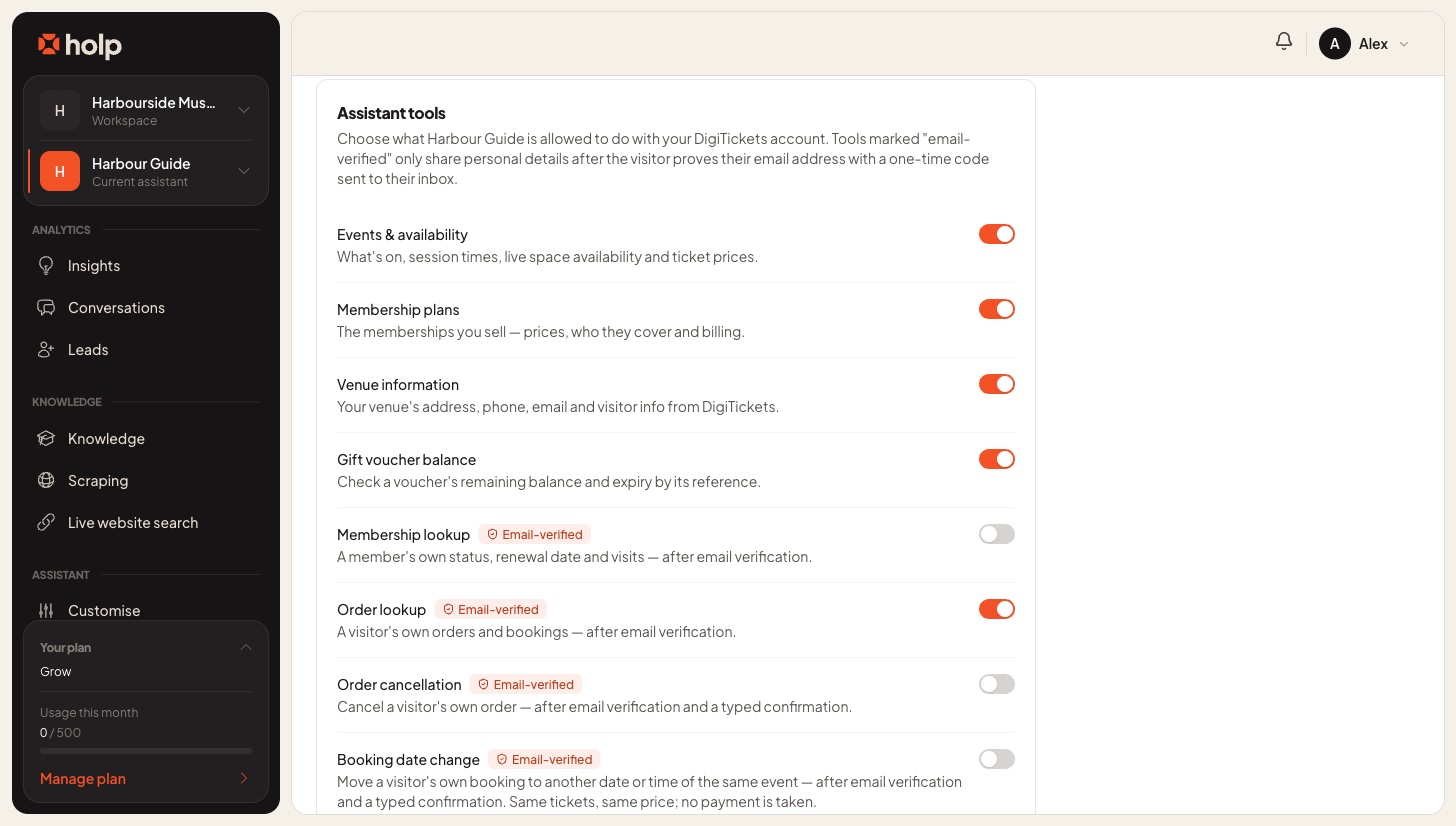
Each tool has its own switch, so you can start small and add more once you've seen how visitors use it. When you've made your choices, click Save changes at the foot of the list.
Public tools
These four answer general questions and never touch anyone's personal details. The first three are on by default.
- Events & availability: what's on, session dates and times, how many spaces are left and what tickets cost. This is the one most attractions want first, because availability changes by the hour and a website can't keep up with it.
- Membership plans: the memberships you sell, what they cost, who they cover and how they're billed.
- Venue information: your address, phone number, email and visitor information as held in DigiTickets. Your assistant only reaches for this when your knowledge base doesn't already answer the question.
- Gift voucher balance: the remaining balance and expiry date of a voucher, from the reference printed on it. This one starts switched off.
Email-verified tools
These four deal with a visitor's own bookings and membership, so they all start switched off and they all require the visitor to prove their email address first.
- Membership lookup: a member's own plan, status, renewal date and visits.
- Order lookup: a visitor's own orders and bookings, with dates, items, totals and status.
- Order cancellation: cancels a visitor's own order.
- Booking date change: moves a visitor's own booking to another date or time of the same event, keeping the same tickets at the same price. No payment is taken.
How email verification keeps bookings private
When a visitor asks about their own booking, your assistant opens a secure form inside the chat. The visitor enters either their email address or their booking reference, and Holp emails them a six-digit code. Their bookings are then matched to that email address, so they only ever see their own. If they gave a booking reference, the code goes to the email address DigiTickets holds for that booking, and they're only shown a masked hint of where the code went, so nobody can learn a stranger's email address by guessing references.
The email address and the code go straight from that form to Holp's servers. They never appear in the conversation and the AI never sees them, and the assistant is told never to ask visitors to type personal details into the chat. Verification is checked on the server every time a tool runs, so a visitor who simply claims to be verified gets nowhere.
A few limits keep it tight:
- Each code lasts 10 minutes and allows 5 attempts.
- A visitor can request 3 codes in any 30 minutes.
- Once verified, they stay verified for 30 minutes of that conversation.
If verification keeps failing, the assistant offers to put them in touch with your team instead.
The email-verified tools need the current Holp chat widget, because the older classic widget has no secure form. If your assistant still runs the classic widget, only the four public tools are used, whatever the switches say.
How cancelling and changing a date work
Neither happens on the strength of one message. The assistant first finds the booking and tells the visitor exactly what it's about to do, and the change only goes through once they reply with a single confirming word: CANCEL to cancel, or MOVE to change the date. That check reads the visitor's actual reply on Holp's servers, so it can't be skipped.
A date change only works where the event allows customers to amend their bookings in DigiTickets and the new session has space. Holp reserves the new session before it cancels the old one, so if anything fails along the way the visitor keeps their original booking rather than ending up with nothing.
How do I disconnect DigiTickets?
Click Disconnect beside the connected account and confirm. Every DigiTickets tool is switched off for that assistant and the stored key is deleted. You can connect again at any time, though you'll need to choose your tools afresh.
Use DigiTickets? Talk to us
If your attraction sells its tickets through DigiTickets, we'd love to hear from you. We can walk you through the connection, suggest which tools suit your attraction, and show you what visitors ask most often once live availability is in the chat.