Insights is the first screen you see when you sign in to Holp, and it answers one question: is this thing working? Not in a vague sense — in numbers you can act on.
This guide explains what each part of it means and, more usefully, what to do about it.
Start with the date range
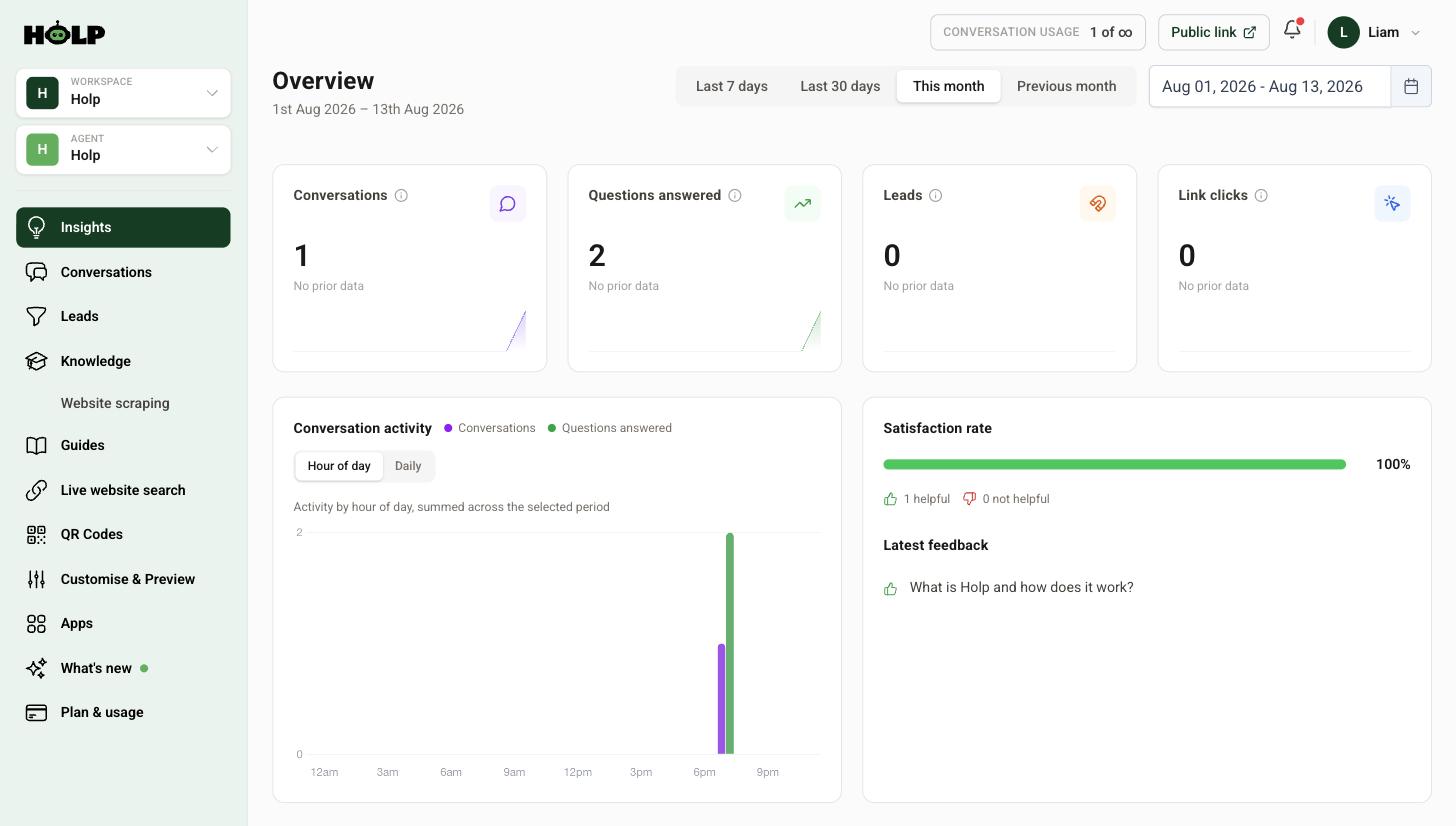
Top right you have Last 7 days, Last 30 days, This month, Previous month, and a custom range.
This trips people up constantly. It defaults to the current month, so on the 2nd of the month everything looks like it has collapsed. If a panel is empty, check the range before you panic.
Last 30 days is the most useful default for a routine check, because it always has a reasonable amount of data in it.
The four numbers along the top
Conversations
How many chats started. This is your usage number, and it answers the question everything else depends on: are people finding it?
If it is very low, nothing else on this screen matters yet. Check that the widget is actually on your site and visible on mobile — see why the Holp widget is not showing.
Questions answered
How many questions your assistant handled. Compare it with conversations: a much higher number means people are asking follow-up questions, which is a good sign. Roughly equal numbers mean most people ask one thing and leave, which is fine for a quick-answer site and less good if you expected conversations.
Leads
How many visitors shared contact details or escalated to a human. If this is zero and you expected enquiries, check your lead capture setting — the default only asks on explicit escalation.
Link clicks
How often visitors clicked links your assistant offered. It tells you whether people are following through to your booking page, your form, your product page. A healthy number here means your assistant is not just answering, it is moving people along.
Conversation activity
A chart with two views. Hour of day shows when people ask, summed across the period. Daily shows the trend over time.
The hour-of-day view is the more interesting one, because it usually contains a surprise. Most organisations find a solid block of activity outside their office hours — evenings, early mornings, weekends. Those are the people your assistant is helping who would otherwise have got nothing.
It is also the strongest argument against switching on operating hours without thinking about it.
Satisfaction rate
Visitors can rate answers as helpful or not, and this panel shows the proportion who found them helpful, along with the latest feedback.
Two things worth knowing. First, only a minority of visitors rate anything, so treat it as a signal rather than a measurement. Second, negative ratings are the more useful ones — each is somebody telling you precisely which answer failed them. Open that conversation, look at the knowledge used, and fix the entry.
Latest queries
The actual questions people asked, in their own words. Read this even when the numbers look fine.
It shows you the vocabulary your customers use, which is often not the vocabulary you use. Those words belong in your knowledge entry keywords, and often in your website copy too.
Knowledge gaps
Questions your assistant could not answer. This is the panel that turns Insights from a report into a to-do list. Each gap is a knowledge entry waiting to be written.
Full detail in how to find and fix knowledge gaps.
Top clicked links
Which links visitors actually followed. Useful for spotting what people are really trying to do, and for noticing when the thing you most want them to click is not being clicked at all.
A monthly review that takes twenty minutes
- Set the range to Last 30 days
- Check conversations against last month. Rising, flat or falling?
- Look at satisfaction. Below about 80 per cent, go and read the unhelpful ones.
- Read latest queries for vocabulary and surprises
- Work through knowledge gaps and write two or three entries
- Check the hour-of-day chart if you are considering operating hours
- Update suggested prompts to match what people are actually asking
Reading the numbers honestly
A few sanity checks. Conversations near zero is a visibility problem, not a content problem. Lots of conversations with poor satisfaction is a knowledge problem. Good satisfaction but no leads means your lead capture is set too conservatively. High link clicks and low leads may be perfectly healthy — people are getting what they need and going straight to your booking page.
A worked example: reading one month
A veterinary practice opens Insights at the end of the month. 214 conversations, 390 questions answered, 9 leads, 61 link clicks, satisfaction 86 per cent.
Almost two questions per conversation means people are having actual exchanges rather than bouncing. 61 link clicks against 214 conversations means roughly a quarter of visitors followed a link the assistant offered — mostly the online booking page, which is exactly what the practice wants.
Nine leads sounds low until you look at what it means: 205 conversations were resolved without anybody on the team touching them. The nine that escalated were genuinely complicated.
Satisfaction at 86 per cent is fine, but the interesting part is the 14 per cent. Reading those, seven of the unhelpful ratings are on answers about out-of-hours emergency cover — a single entry that turns out to be vague. Fixing one entry addresses half the month’s negative feedback.
That is what a good monthly review produces: not a verdict, but one specific thing to fix.
Comparing months honestly
Raw month-on-month comparisons mislead more often than they help, because months are not equal. February is short. August is quiet for some sectors and frantic for others. A bank holiday moves traffic between weeks.
Two habits make comparison meaningful:
- Use Last 30 days consistently rather than calendar months, so you are always comparing the same length of period.
- Compare with the same month last year as well as with last month, once you have the history. Seasonal businesses learn far more from that than from the month before.
The hour-of-day chart is worth ten minutes
Most people glance at this and move on. It usually contains the most surprising thing on the screen.
Look at how much of your activity sits outside the hours anybody is working. For a lot of organisations it is a third or more — evenings, early mornings, weekends. Those conversations either got answered by your assistant or would not have happened at all.
It is also the answer to whether operating hours are a good idea on your site. If a third of your value arrives at nine in the evening, hiding the widget at six is expensive.
Turning Insights into a one-page report
If you need to report upwards, four numbers and one sentence usually do it:
- Conversations this period, and the direction of travel
- Satisfaction rate
- Leads generated
- Number of knowledge gaps closed
- One sentence on the most common thing people asked about
That last line is the one non-technical colleagues actually care about, because it is customer insight rather than a usage statistic.
Frequently asked questions
Why is my Insights screen empty?
Almost always the date range. It defaults to the current month. Switch to Last 30 days or Previous month.
What is a good satisfaction rate?
Above 80 per cent is a reasonable benchmark, but the number matters less than the negative ratings. Each one points at a specific answer worth fixing.
What is the difference between conversations and questions answered?
A conversation is one chat session. Questions answered counts the individual questions within them, so a higher ratio means people are asking follow-ups.
Why do I have conversations but no leads?
Usually because lead capture is set to ask only on explicit escalation. Change it in the Behaviour tab if you want more contacts.
Can I see which questions were asked?
Yes, in the Latest queries panel, and in full in the Conversations screen.
Does Insights cover all my assistants?
Insights is per assistant. Use the agent selector at the top left to switch between them.
How often should I check it?
Monthly is enough for most organisations. Check weekly in the first month or two while you are still filling knowledge gaps.
Where to go next
- How to find and fix knowledge gaps
- How to review conversations
- How to improve your assistant’s answers
More from Holp
- What is customer chat support? — the full guide, including the KPIs worth tracking
- Best AI agents for customer service in 2026 — how the options compare, honestly
- All resources — tools, comparisons and platform guides in one place