
The Advanced tab is where you choose which AI model answers your visitors and add your own instructions on top of Holp’s. Holp itself describes these as power-user settings to touch only when needed, and that is fair advice — but used carefully they are the difference between a good assistant and one that sounds like it works for you.
Where to find it
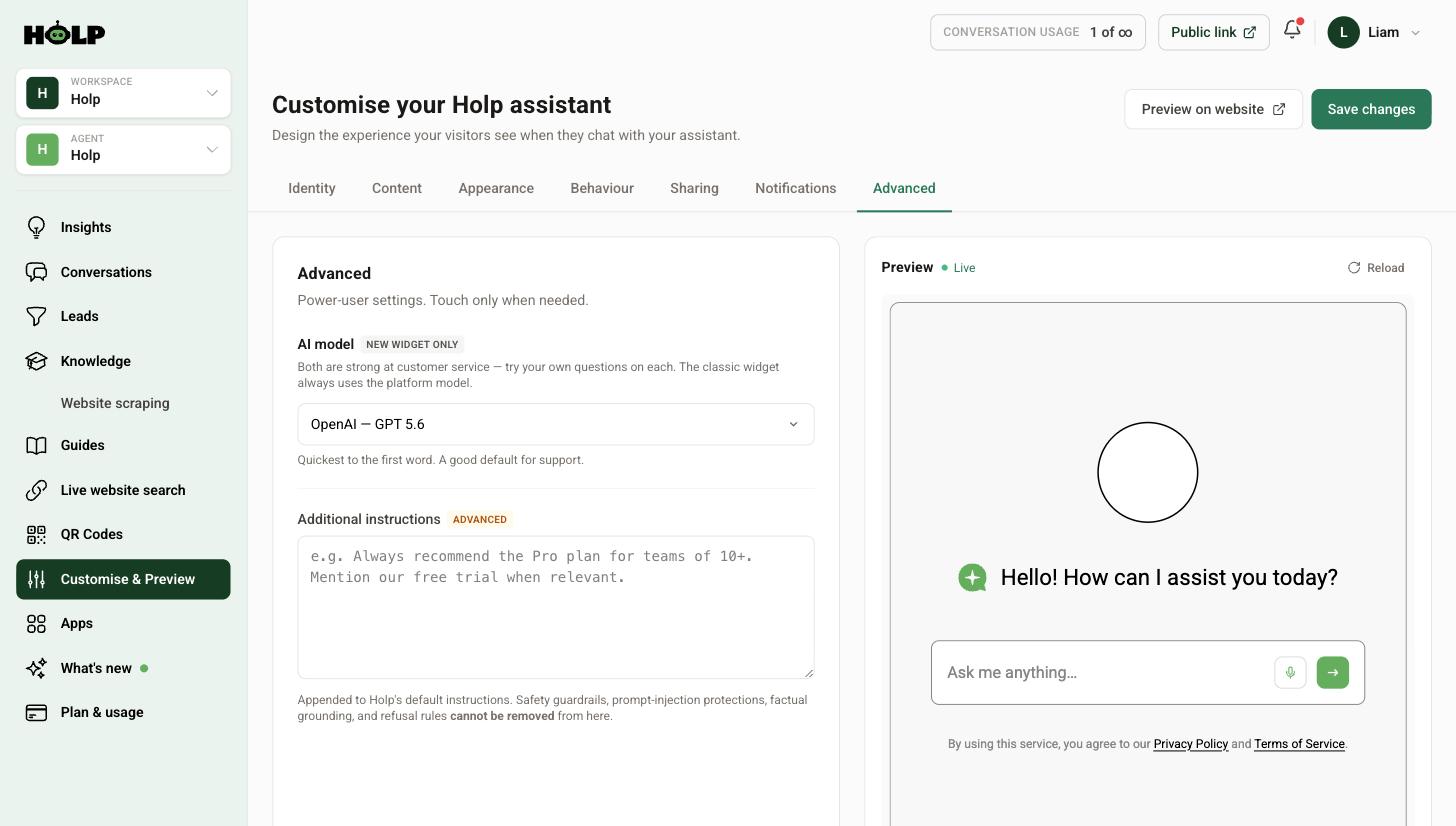
Go to Customise & Preview and open the Advanced tab.
Choosing an AI model
You can pick between an OpenAI model and an Anthropic model. This applies to the newer widget — the classic widget always uses the platform model.
Holp’s own guidance is the most useful thing to say here: both are strong at customer service, and the right move is to try your own questions on each. The default option is noted as being quickest to the first word, which matters more than you might think in a support context — a visitor watching a blank box for three seconds often gives up.
How to actually compare them
Do not judge on one question. Write down five real questions from your conversations, including one awkward one and one you know you cannot answer. Ask all five on one model, switch, and ask all five again.
Judge on three things: is it correct, does it sound like you, and how quickly does it start replying. Correctness usually ties, and the decision comes down to the other two.
Additional instructions
This is a free-text field appended to Holp’s default instructions. It shapes behaviour across every answer, which makes it powerful and worth handling carefully — Holp warns that changes here can dramatically alter how your assistant behaves.
Importantly, it adds to Holp’s instructions rather than replacing them. Safety guardrails, prompt-injection protections, factual grounding and refusal rules cannot be removed from here. You are steering the assistant, not overriding its foundations.
What works well here
- Standing commercial rules. Always mention the free trial when someone asks about pricing.
- Routing. For anything about complaints, point people to the complaints form rather than attempting to resolve it.
- House style. Use British spelling. Never use exclamation marks. Refer to customers as guests.
- Boundaries. Do not give medical, legal or financial advice; suggest contacting the team instead.
- Emphasis. When several options exist, lead with the one that is free.
What does not belong here
Facts. This is the most common mistake. Opening times, prices, policies and product details belong in knowledge entries, where you can see them, edit them and check when they were last updated. Facts buried in an instructions box are invisible, unversioned and easy to forget about when they change.
A simple test: if it is something that could go out of date, it is knowledge. If it is a rule about how to behave, it belongs here.
Writing instructions that work
- Be specific. “Keep answers under 100 words unless asked for detail” beats “be concise”.
- Say what to do, not just what to avoid. Give the alternative.
- Keep it short. A handful of clear rules is followed more reliably than twenty.
- One rule per line. Easier to read, easier to remove.
Test before you settle
The warning on this tab is not decoration. Instructions apply to every conversation, so a badly worded rule can quietly degrade every answer.
After any change, ask the same five questions again. Check that the new rule is being followed, that answers you were happy with are still good, and that nothing has become oddly stilted. If something has gone wrong, remove the rule you just added rather than adding another to compensate.
Start with nothing
A genuinely useful default: leave additional instructions empty until you have a specific problem to solve. Most complaints about assistant behaviour turn out to be knowledge problems, and adding instructions to paper over a knowledge gap makes things worse, not better.
If answers are wrong or vague, start with how to improve your assistant’s answers. Come here only when the behaviour, rather than the information, is what needs changing.
A worked example: three rules that earned their place
A ticketed attraction ended up with exactly three lines in additional instructions, added one at a time over several months. Each solved a specific, observed problem.
“When asked about prices, always mention that under-5s go free.” Added after conversations showed families being quoted adult and child prices and never being told about the free entry, which was the thing that made them book.
“For anything about lost property, direct visitors to the enquiry form rather than attempting to help.” Added because the assistant kept giving reasonable-sounding general advice when the only real answer was a form the team monitors.
“Use British spelling and never use exclamation marks.” Added because the brand voice is dry and the default was a bit too cheerful.
Three lines, each traceable to something someone actually noticed. That is what a healthy instructions field looks like — not a page of aspirations written on day one.
Knowledge or instruction? A test that works
People get stuck on this, so here is a quick way through it. Ask: could this ever change without anybody telling me?
Opening times change. Prices change. Product lines change. Staff names change. All knowledge, all belonging in entries where they are visible and dated.
“Never give medical advice” does not change. “Keep answers short” does not change. “Route complaints to the form” does not change. Those are instructions.
The reason it matters: a price hidden in an instructions box will still be wrong in two years, because nobody looks there. A price in a knowledge entry shows a last-updated date and turns up when you sort by age.
Keeping a changelog
Because instructions affect every answer, it is worth knowing what you changed and when. There is no version history to fall back on, so keep your own — a note in a shared document with the date, the line you added and why.
When answers start feeling off in six weeks’ time, that list is the difference between a two-minute fix and an afternoon of guesswork.
A safe way to make a change
- Run your ten test questions and note the answers
- Add one rule
- Save, and run the same ten questions again
- Check the new rule is followed and nothing else has drifted
- Record what you changed and why
- Leave it a week before adding another
One rule at a time is slower and it is the only way to know which change caused which effect.
Frequently asked questions
Which AI model should I choose?
Both are strong at customer service. Try five of your own real questions on each and pick the one that sounds most like you and starts replying quickest.
Does the model choice apply to the classic widget?
No. The classic widget always uses the platform model. Model choice applies to the newer widget.
What are additional instructions for?
Rules about behaviour — tone, routing, emphasis, boundaries. They are appended to Holp’s own instructions rather than replacing them.
Can I remove Holp’s safety rules from here?
No. Safety guardrails, prompt-injection protections, factual grounding and refusal rules cannot be removed through this field.
Should I put opening times and prices in the instructions?
No. Facts belong in knowledge entries where you can see and update them. Instructions are for rules about behaviour.
My answers got worse after adding instructions. What now?
Remove the rule you last added rather than adding another to compensate, then re-test with the same set of questions.
Do I need to use this tab at all?
No. Most organisations get a good assistant from knowledge, identity and content settings alone. Come here when behaviour, not information, needs changing.
Where to go next
- How to improve your assistant’s answers
- How to set your assistant’s name, tone and greeting
- How to add knowledge to your Holp assistant
More from Holp
- What does a chatbot cost? — every pricing model, and the costs nobody lists
- Best AI agents for customer service in 2026 — how the options compare, honestly
- All resources — tools, comparisons and platform guides in one place