
Conversations is the most useful screen in Holp, and the one people look at least. It is a record of exactly what your customers asked, in their own words, and exactly what they were told.
Read it for twenty minutes a week and you will learn more about your customers than most organisations learn in a year of surveys.
What you are looking at
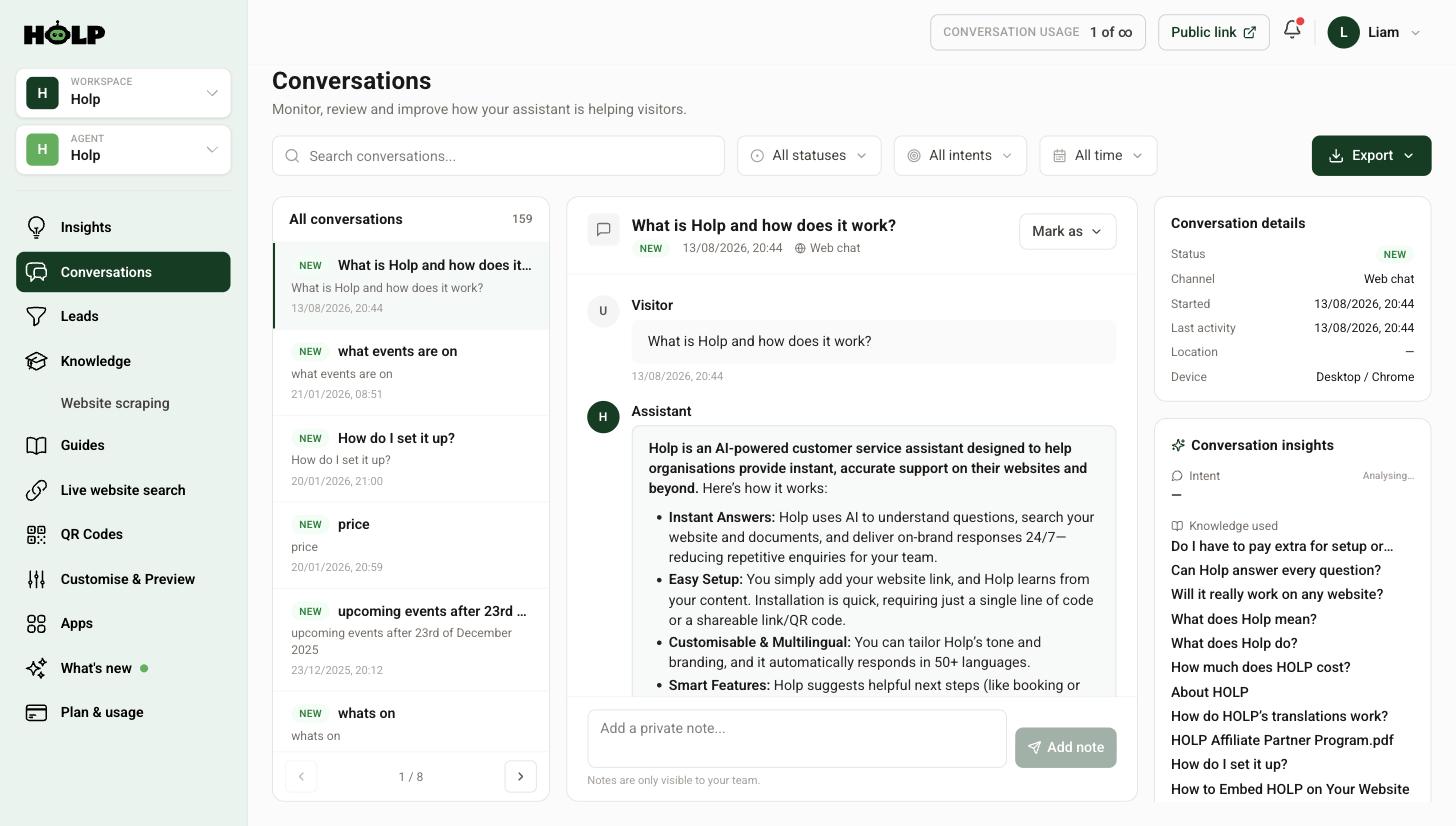
Click Conversations in the left-hand menu. The list of chats sits on the left, the selected conversation in the middle, and details about it on the right.
The details panel
For each conversation you can see:
- Status — whether it is new, escalated or dealt with
- Channel — where it came from, such as web chat
- Started and last activity — when it happened
- Location and device — broad context, such as desktop and browser
Conversation insights
Below that sits the part worth paying attention to:
- Intent — what the visitor was actually trying to do
- Knowledge used — the exact entries the assistant drew on
- Resolution — how it ended, including whether it was escalated to a human
Knowledge used is the diagnostic tool. When an answer is wrong, this tells you which entry produced it — so instead of guessing, you open that entry and fix it.
Finding the conversations that matter
You will not read 500 chats. Use the filters at the top to find the ones worth reading:
- Search — look for a specific word. Searching for a product name shows you everything people asked about it.
- All statuses — narrow to escalated conversations, which are the ones where something went wrong or a human was needed.
- All intents — group by what people were trying to do.
- All time — restrict to a period, such as since your last change.
A good weekly habit: filter to escalated conversations from the last seven days and read every one. It is usually a short list, and it is where all the problems live.
Private notes
Each conversation has a note box at the bottom. Notes are visible to your team and never to the visitor.
Use them to leave a trail: “Called back, sorted”, “This is the third time this week, we need an entry for it”, “Answer was wrong, fixed the refunds entry”. On a team of more than one person these are what stop the same enquiry being chased twice.
Marking conversations
The Mark as button lets you set a status so your team knows what has been dealt with. Whatever convention you adopt, adopt one — an inbox where everything says New forever tells you nothing.
Exporting
The Export button gives you the conversation data to work with elsewhere — useful for a quarterly review, for sharing themes with a wider team, or for counting how often a particular topic came up.
Turning conversations into improvements
Reading is only half of it. The loop that makes an assistant get better over time:
- Read this week’s escalated conversations. Every one is a question you could not answer.
- Look at the questions asked most. If the same thing comes up repeatedly, it deserves its own knowledge entry and probably a suggested prompt.
- Check the wording people use. If customers say something different to what you say, add their words as keywords.
- Fix answers that were wrong. Knowledge used tells you exactly which entry to edit.
- Note what people wanted that you do not offer. That is product feedback, and it is free.
Then check knowledge gaps on the Insights screen, which does some of this analysis for you.
A realistic routine
Weekly, twenty minutes: read escalated conversations, note recurring questions. Monthly, an hour: review the most common questions, update knowledge, refresh suggested prompts, check whether last month’s fixes worked.
That is enough. The organisations that get the most out of this are not the ones doing something clever — they are the ones actually doing it every week.
A worked example: reading one week
A garden centre filters to escalated conversations from the last seven days and finds four.
Two are about delivery to a postcode they do not cover. The assistant said it did not know. The fix is a knowledge entry listing the delivery area plainly, including the bit where they do not deliver — a clear no is a good answer.
One asked whether a plant is safe for cats. Nobody had thought about that. It turns out to be a common question, so it becomes an entry, and a note goes to the buying team.
One is a complaint about a damaged order. The assistant correctly escalated rather than trying to handle it. That is the system working. The note on the conversation records that it was resolved by phone.
Twenty minutes of reading produced two knowledge entries, one piece of product feedback and one confirmation that escalation is behaving. That is a good week, and it is entirely typical.
What to look for beyond the obvious
Once you are past the escalated conversations, three patterns are worth watching:
- Questions asked twice in one conversation. The visitor did not get what they needed the first time and tried again with different words. Those rephrasings are gold — they are exactly the keywords your entry is missing.
- Conversations that stop abruptly after an answer. Sometimes that means satisfied. Sometimes it means gave up. Read the answer and decide which.
- Questions that are really about something else. Somebody asking about opening times at nine in the evening is often asking whether they can still get something today.
Sharing what you find
Conversations are useful well beyond the person maintaining the assistant. The vocabulary belongs to whoever writes your website copy. Repeated questions about a product belong to whoever buys or builds it. Complaints belong to whoever can fix the cause.
You do not need a formal process. A short monthly note to the wider team — here are the five things people asked most, here is what surprised us — is usually enough, and it makes the assistant obviously valuable to people who never log in to it.
A weekly routine you will actually keep
- Filter to escalated, last seven days
- Read each one and add a private note recording what you did
- Write down any question that needs an entry
- Write those entries before you close the tab — a list of intentions is not an improvement
- Skim the search box for one topic you care about this week
Frequently asked questions
Can visitors see my notes?
No. Notes are private to your team.
What does Knowledge used mean?
It lists the knowledge entries the assistant drew on for that answer. When an answer is wrong, it tells you exactly which entry to fix.
What does escalated mean?
The conversation was passed to a human, either because the visitor asked or because the assistant could not help. Escalated conversations also appear under Leads when contact details were shared.
How often should I read conversations?
Twenty minutes a week is enough for most organisations, focused on escalated conversations, plus a longer monthly review.
Can I search for a specific topic?
Yes. Use the search box to find every conversation mentioning a word or phrase.
Can I export conversations?
Yes, using the Export button on the Conversations screen.
What is the difference between Conversations and Leads?
Conversations shows every chat. Leads shows only those where a visitor escalated or shared contact details, so follow-ups do not get lost.
Where to go next
- How to find and fix knowledge gaps
- How to use the Insights dashboard
- How to improve your assistant’s answers
More from Holp
- What is customer chat support? — the full guide, including the KPIs worth tracking
- Best AI agents for customer service in 2026 — how the options compare, honestly
- All resources — tools, comparisons and platform guides in one place