Some information will not sit still. What is on this weekend, whether tickets are left, this month’s opening times, the current vacancies. Copy it into your assistant’s knowledge and it is out of date by Friday.
Live website search solves that. Instead of copying pages in, your assistant reads them on your website at the moment a visitor asks, and answers from what it finds right then.
How it works, in plain terms
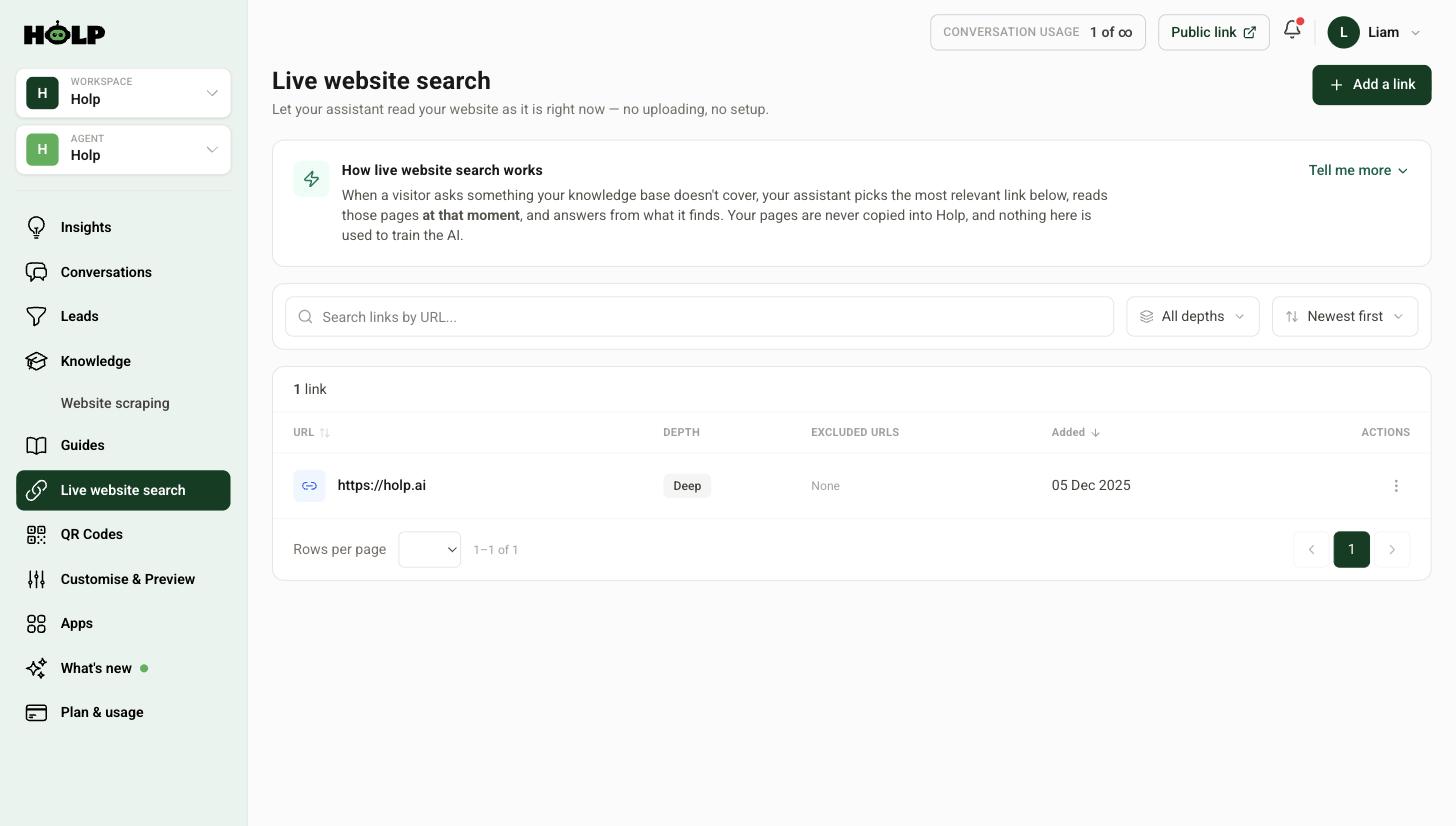
When a visitor asks something your knowledge base does not cover, your assistant picks the most relevant link from your list, reads those pages at that moment, and answers from what it finds.
Your pages are never copied into Holp, and nothing here is used to train the AI.
It is a safety net, not a replacement
This is worth being clear about, because it changes how you use it. Your assistant always checks your knowledge base first, and only falls back to your website when it finds nothing relevant.
Knowledge you have written yourself gives faster, more consistent answers. Live search is what catches the things you have not written yet, and the things that change too often to write.
Step 1: Add a link
Click Live website search in the left-hand menu, then Add a link.
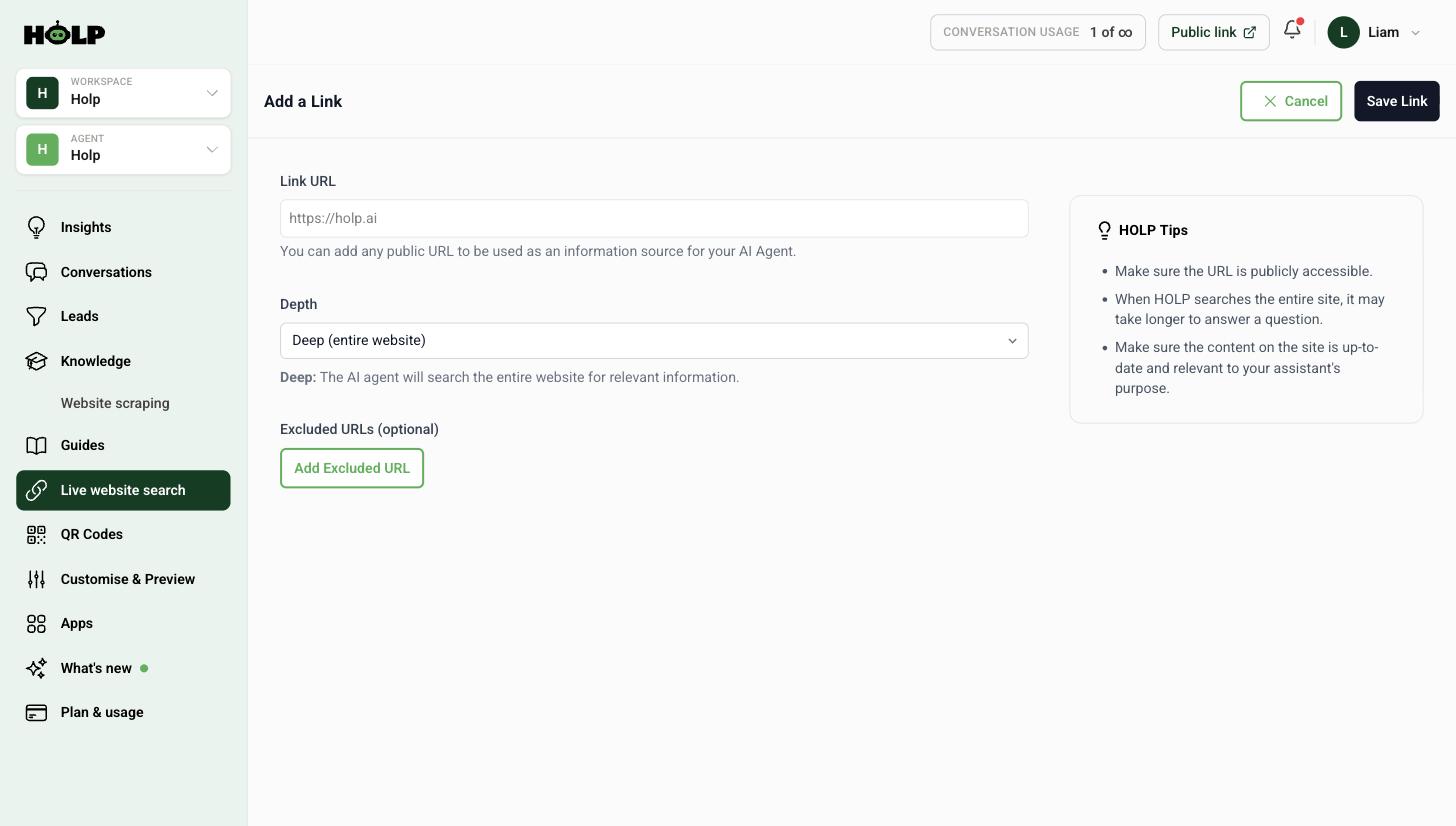
Paste the address. It must be a page the public can reach — anything behind a login, a form or a cookie wall cannot be read.
Step 2: Choose deep or single page
This is the only decision that really matters, and it is worth getting right.
Deep
The assistant can look across the pages under that address. Best for a section that changes often — a what is on listing, a vacancies section, a news area. Add the section address and let it find the individual pages itself.
Single page
Reads only the exact page you give it. Best for one page that must always be quoted accurately — opening times, prices, a specific policy. Nothing else on your site can muddy the answer.
Excluded URLs
On a deep link, you can exclude pages you would rather the assistant never used. Old campaign pages, archived events, anything you have left up but no longer stand behind.
Click Save Link and it is live immediately.
What it cannot do
Being honest about the limits will save you time later:
- It reads a portion of each page, not every word. Very long pages get trimmed.
- It cannot see anything behind a login, a form or a cookie wall.
- It adds a few seconds to an answer, because pages are fetched live.
- Pages that only render once a browser runs them may come back empty.
That last one catches people out. If a page builds itself in the browser rather than arriving complete, live search may find nothing. Test it before you rely on it.
Step 3: Test with real questions
Ask your assistant something that only the live page can answer — today’s opening time, this week’s events — and check the answer against the page itself.
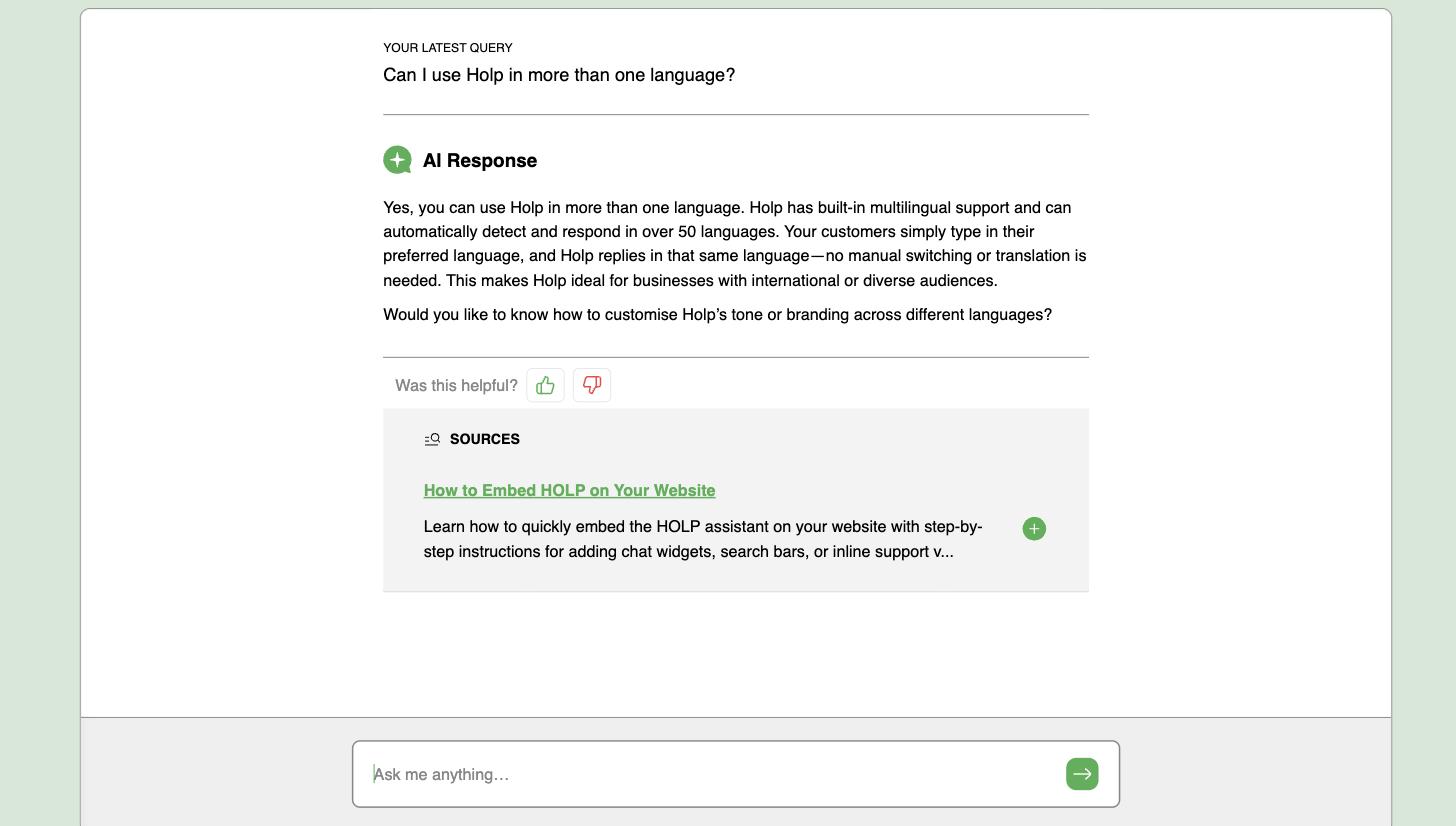
If you get a vague answer, the page is probably too long, or the information is not in the text. If you get nothing at all, the page may not be readable without a browser.
A sensible setup
For most organisations this works well:
- Write knowledge entries for everything stable — who you are, what you do, policies, the questions you answer every day.
- Import your website for the rest of your published content.
- Add one or two live links for the sections that genuinely change week to week.
Adding a live link to your entire website is tempting and usually a mistake. It makes answers slower and less predictable, and it does not remove the need to write good knowledge.
Live search or importing?
- Importing copies pages into knowledge. Faster answers, editable, re-checked automatically. Best for stable content. See how to import your website.
- Live search reads pages on demand. Always current, slightly slower, not editable. Best for content that moves.
They work together, and most sites want both.
A worked example: a what is on section
An arts centre has a what is on section that changes weekly. Events go up, sell out, get cancelled, get added. Copying that into knowledge would mean copying it again every Monday.
Instead they add one deep link to the what is on section, and exclude the archive of past events so the assistant never quotes something from March.
Everything else stays as written knowledge: how to book, the access information, parking, the bar, refunds, the membership scheme. All stable, all better as entries.
The result is an assistant that answers “what is on this weekend?” from the live page, and “can I get a refund?” instantly from knowledge. One link doing a specific job, rather than live search being used as a substitute for writing things down.
They add a second single-page link for their opening times page, because that page must always be quoted exactly and they do not want it competing with anything else on the site.
Deep or single page: a simple test
Ask yourself what would happen if the assistant read the wrong page under that address.
If the answer is “probably fine, it is all related”, use deep. A section of related pages that change often is exactly what it is for.
If the answer is “that would be a problem” — because there are old prices, superseded policies or last year’s dates elsewhere under that path — use single page, or use deep with those pages excluded.
Using exclusions well
Exclusions are the difference between a deep link that helps and one that occasionally embarrasses you. Common candidates:
- Archived or past events
- Old campaign landing pages you have left up
- Press releases announcing things that have since changed
- Anything with a year in the URL that is not this year
It is worth actually browsing the section you are pointing at before you save the link. Most sites have at least one page under a tidy-looking path that nobody has thought about in three years.
Why answers can be slower
Live search fetches pages at the moment of asking, so it adds a few seconds. That is a real cost in a support context, where a visitor watching a blank box tends to assume something is broken.
It is another argument for using live search narrowly. The more links you add, the more often the assistant reaches for them, and the more often visitors wait. One or two well-chosen links keep the slow path rare.
A short checklist
- Write knowledge for everything stable first
- Add live links only for content that genuinely changes week to week
- Choose deep for a section, single page for a page that must be exact
- Browse the section and exclude anything stale
- Test with a question only the live page can answer
- Check the page is readable without a browser — if it comes back empty, write the facts as an entry instead
Frequently asked questions
Does live website search copy my pages into Holp?
No. Pages are read at the moment a question is asked and are not stored in Holp, and nothing found this way is used to train the AI.
Will it slow down answers?
A little, yes — a few seconds, because the page has to be fetched. That is why it is used only when your knowledge base has nothing relevant.
Can it read pages behind a login?
No. Only pages the public can reach can be read. That includes anything behind a form or a cookie wall.
What is the difference between deep and single page?
Deep lets the assistant look across the pages under an address, which suits a section that changes often. Single page reads only the exact page you gave it, which suits a page that must always be quoted accurately.
How many links should I add?
Usually one or two. Live search is a safety net for content that moves, not a substitute for written knowledge. A long list makes answers slower without making them better.
Why did my page come back empty?
Most often because the page only builds itself once a browser runs it, so there is nothing to read. Add the key facts as a knowledge entry instead.
Does the assistant check my knowledge base first?
Always. Live website search is only used when nothing relevant is found in your knowledge.
Where to go next
- How to import your website into Holp
- How to add knowledge by hand
- How to improve your assistant’s answers
More from Holp
- Sitemap extractor — check a crawler can find the pages Holp needs to read
- Answerability check — see which customer questions your site cannot answer yet
- All resources — tools, comparisons and platform guides in one place