Most visitors who need to speak to someone will not fill in a contact form. They will ask a question, not get the answer they need, and leave. Lead capture catches those people: when your assistant reaches its limit, it offers to take their details instead of letting them go.
This guide covers when to ask, how to set it up, and where the details end up.
Where to find it
Go to Customise & Preview, open the Behaviour tab and expand Lead capture.
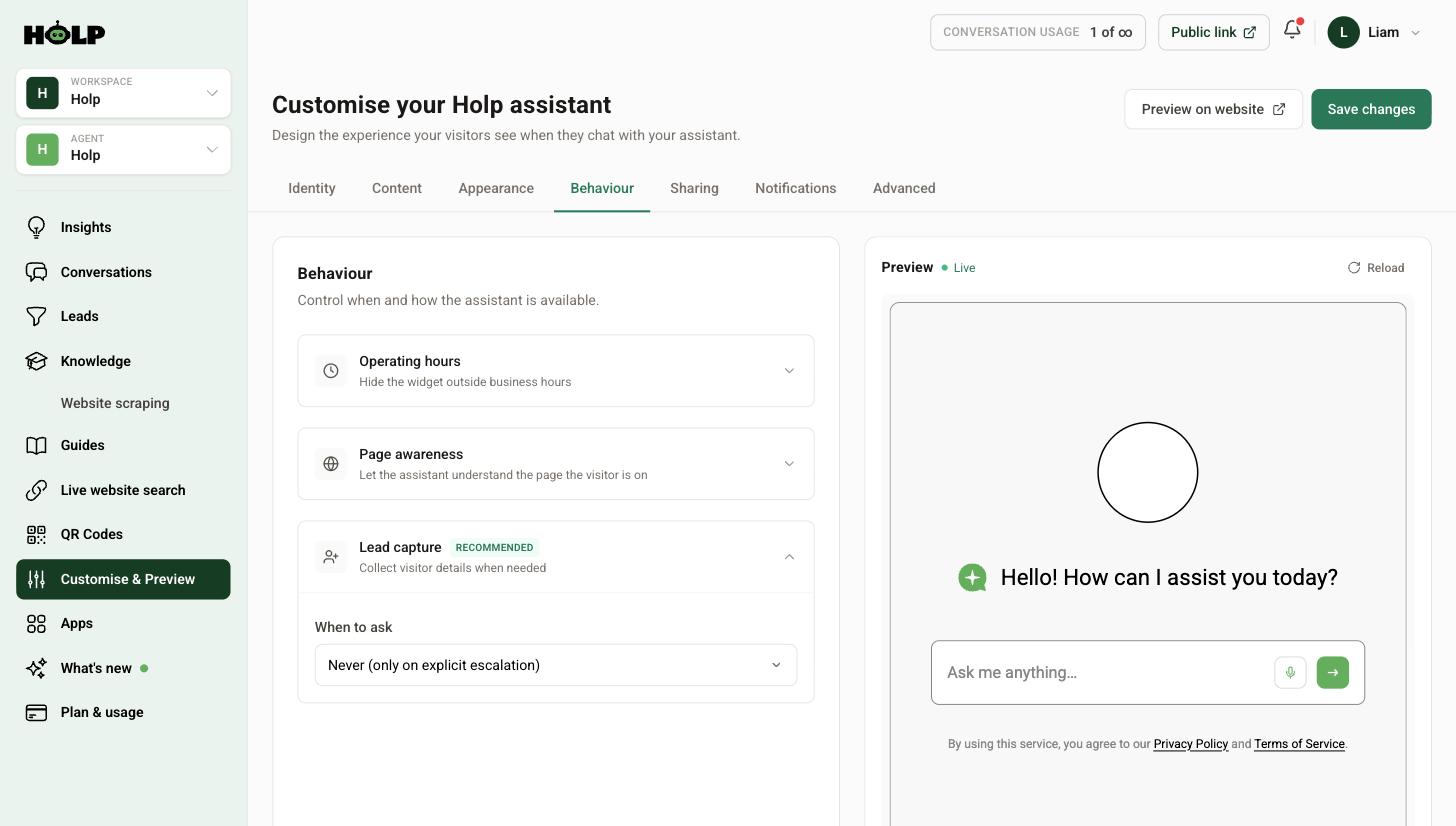
Choosing when to ask
This is the whole decision. There are five options, and they behave very differently.
Never (only on explicit escalation)
Details are only taken when a visitor actually asks to speak to a human. The least intrusive option, and a reasonable default for information-heavy sites where most people just want an answer.
Before the first message (gate)
Visitors give their details before they can ask anything. It captures the most contacts and it costs you the most conversations — a good number of people will simply close the widget rather than hand over an email address to ask about parking.
Only worth it if every enquiry is genuinely a sales lead and you would rather have fewer, more qualified ones.
After N messages
The assistant answers a few questions first, then asks. The visitor has had value before you ask for anything, which makes them much more likely to say yes.
A sensible number is three. Two can feel abrupt; five and most conversations are over before you ask.
When the assistant cannot answer
Asks precisely when the assistant has run out of road. This is the option most organisations should pick. Nobody is interrupted while they are being helped, and everybody who is not being helped gets offered a human.
Only when the visitor asks for a human
Similar to Never, but framed around the visitor’s request. The gentlest setting, and it works well when your team is small and you would rather handle a few high-intent enquiries properly.
A recommendation
If you are unsure, start with When the assistant cannot answer. It captures the people you are actually losing, without taxing the people you are successfully helping. Review it after a month and move to After N messages if you want more volume.
Where the details go
Captured contacts appear under Leads in the left-hand menu. Each one shows the whole conversation that led to it, not just the name and email.
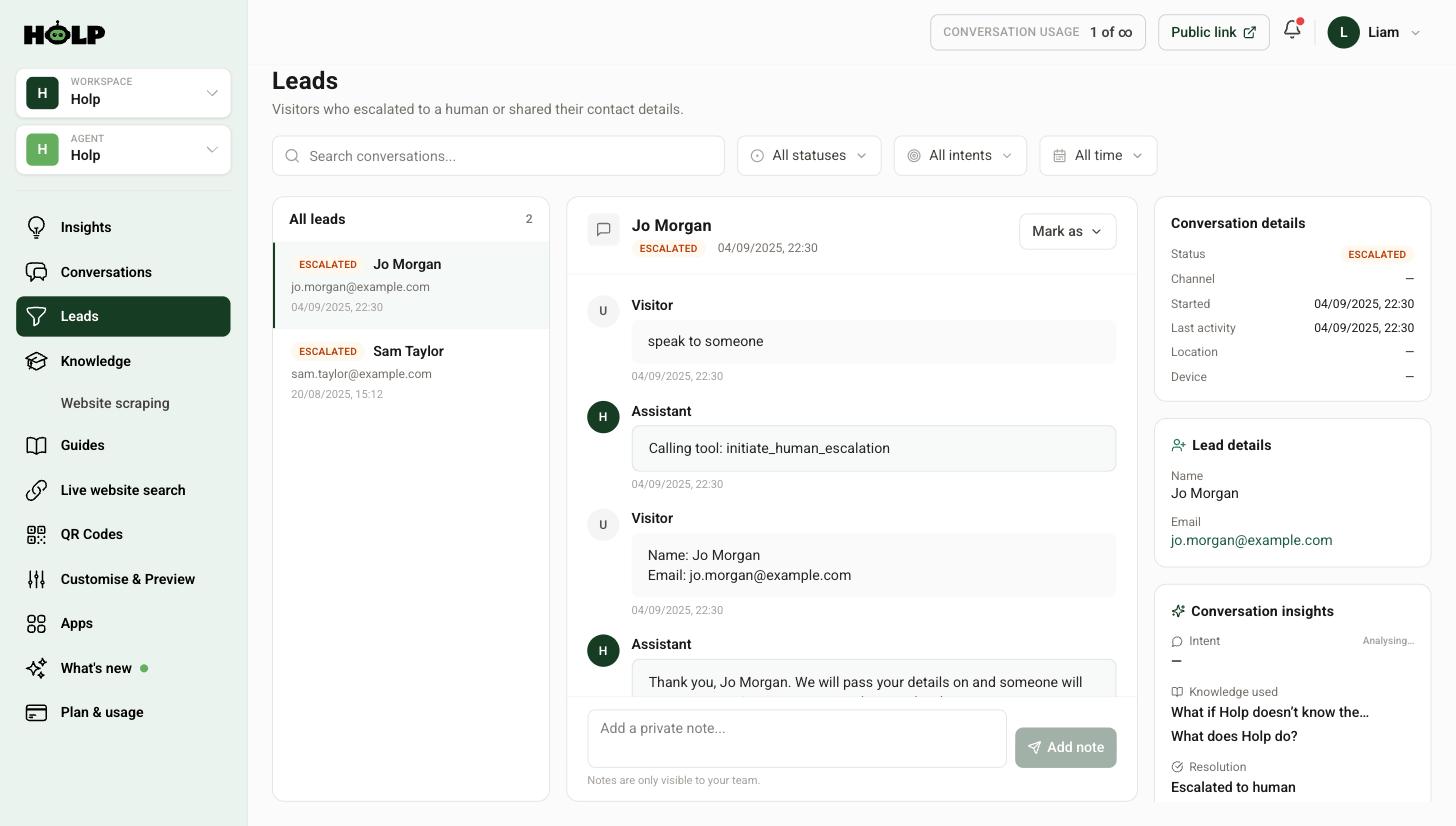
That context is the valuable part. You can see exactly what they were asking about, what the assistant told them, and where it fell short — so your first reply can answer the question rather than asking what they wanted.
The right-hand panel shows the conversation status, the knowledge that was used, and how the conversation resolved. You can also add private notes for your team.
Get notified
A lead nobody sees is not a lead. Open the Notifications tab and make sure A lead is captured is switched on.
Set the notification email to a shared inbox rather than one person’s address, so the loop does not break when someone is on holiday. See how to set up email notifications.
Reply quickly
Someone who has just been on your website and asked a question is about as warm as an enquiry gets. An hour later they are comparing you with two competitors. Whatever process you have, make it fast.
A simple, effective routine: leads go to a shared inbox, someone checks it twice a day, every lead gets a reply that answers the original question, and the answer gets added to your knowledge so the next person does not need to ask.
Common mistakes
- Gating everything. Feels efficient, quietly costs you most of your conversations.
- Asking too early. Give value first.
- No notifications. Leads sit unread for a week.
- Sending to a personal address. One person’s annual leave becomes a fortnight of missed enquiries.
- Never fixing the underlying gap. If the same question keeps producing leads, write the answer down and stop needing to have that conversation.
A worked example: the same site, three settings
A building firm tries three lead capture settings over three months, on roughly equal traffic.
Before the first message. 31 contacts, and conversations down by more than half. Most people who wanted to know whether the firm covered their area simply closed the widget rather than hand over an email to ask. The contacts collected were decent, but the site stopped being useful to everyone else.
Never, only on explicit escalation. Conversations recovered completely. Contacts fell to 12 — only the people who thought to ask for a human.
When the assistant cannot answer. 27 contacts, and conversations stayed at full volume. People asking about areas, timescales and rough costs got answers; people asking about their specific extension got offered a callback.
Nearly the same number of contacts as gating, without losing the traffic. That is the pattern most organisations find, and it is why the cannot-answer setting is the sensible starting point.
What to do with a lead in the first hour
Read the conversation before you write anything. It takes thirty seconds and it changes the reply completely.
A generic “thanks for your enquiry, how can we help?” asks the customer to explain themselves for a second time, having already typed it out once. A reply that opens with “You asked about weekend delivery to Preston — yes, we can do that, and here is what it costs” lands very differently.
The conversation is right there on the lead. Use it.
Closing the loop
Every lead is two pieces of information: someone to contact, and something your assistant could not do. Handle both.
- Reply to the person, answering the actual question
- Ask whether the assistant should have been able to answer it
- If yes, write the knowledge entry straight away
- Add a private note to the conversation recording what happened
Do that consistently and the character of your leads changes over a few months. The routine questions stop arriving as leads because the assistant handles them, and what is left is genuinely worth a human’s time.
Handling the details responsibly
Captured contact details are personal data and should be treated as such. Point your privacy notice link at your own policy rather than leaving the default, make sure that policy actually covers enquiries made through a chat assistant, and keep leads to the people who need them rather than sharing them around the office.
Frequently asked questions
What is the difference between a lead and a conversation?
Every chat is a conversation. It becomes a lead when the visitor shares contact details or escalates to a human. Leads have their own screen so they do not get lost among ordinary chats.
Which lead capture setting should I choose?
For most organisations, when the assistant cannot answer. It catches the people you would otherwise lose without interrupting the people who are being helped.
Will asking for details put people off?
It depends when you ask. Before the first message will lose you conversations. After a few messages, or when the assistant cannot help, most people are happy to share.
Do I get an email when someone leaves their details?
Yes, if lead notifications are switched on in the Notifications tab. Point them at a shared inbox rather than one person.
Can I see what the visitor asked before they became a lead?
Yes. Every lead shows the full conversation, the knowledge used and how it resolved.
Can I export leads?
Conversations and leads can be exported from the Conversations screen using the Export option.
Does capturing a lead use up my conversation allowance?
Your allowance counts conversations. A lead is a conversation that ended with contact details, not an extra charge on top.
Where to go next
More from Holp
- What is customer chat support? — the full guide, including the KPIs worth tracking
- Best AI agents for customer service in 2026 — how the options compare, honestly
- All resources — tools, comparisons and platform guides in one place