Your assistant does not have to be on all the time, and it does not have to be ignorant of where the visitor is standing. Two settings on the Behaviour tab handle both: operating hours, and page awareness.
Together they stop the two most common complaints about chat widgets — that they promise help when nobody is around, and that they answer as if the visitor arrived from nowhere.
Where to find them
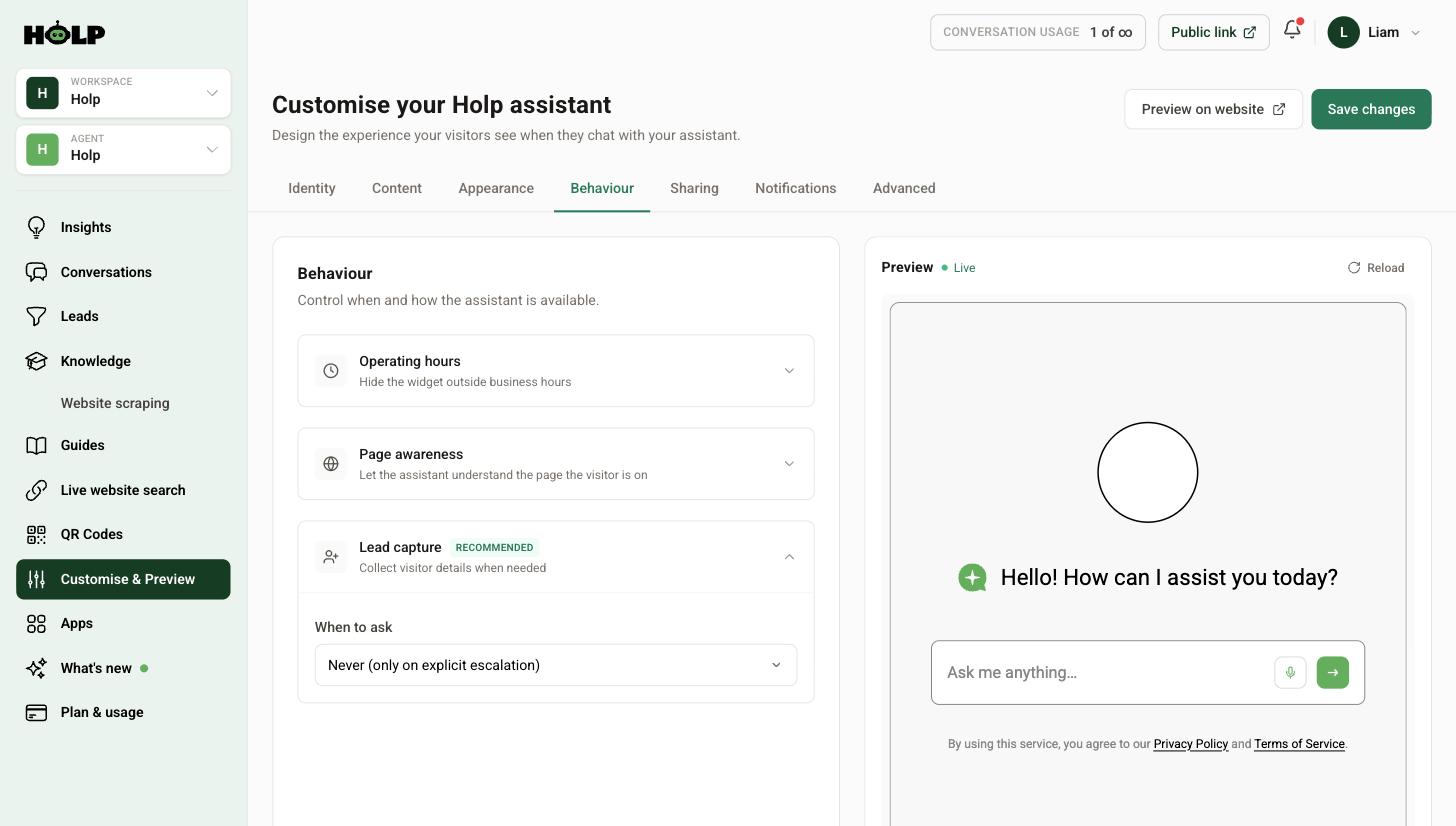
Go to Customise & Preview and open the Behaviour tab.
Operating hours
Expand Operating hours and tick Only show the chat widget during set hours. Outside those hours the widget is hidden and visitors see your offline message instead of an assistant that cannot pass anything on.
Should you use it?
Here is the thing worth thinking about: your assistant answers questions perfectly well at three in the morning. Hiding it overnight removes something useful.
Leave it on all the time if your assistant mostly answers questions — opening times, prices, how things work. Out-of-hours visitors are exactly the people it helps most, because nobody else is available.
Set hours if your assistant is mainly a route to a human. If most conversations end in someone being called back, a widget that promises contact at 11pm sets an expectation you cannot meet before Monday.
There is a middle path that usually beats both: leave the widget on around the clock, and set expectations honestly in the offline message and your knowledge. “Our team replies weekdays 9 to 5” in a knowledge entry works better than hiding the widget entirely.
Setting realistic hours
If you do use hours, use your real ones, including the awkward bits — early closing, bank holidays, the week between Christmas and New Year. Optimistic hours generate complaints; honest hours generate none.
Write an offline message that actually helps: when you will be back, and what someone can do in the meantime.
Page awareness
Page awareness lets the assistant understand which page the visitor is on. It turns a generic assistant into one that knows the context of the question.
Without it, someone on your Refunds page asking “how long does this take?” is asking about nothing in particular. With it, the assistant knows they are asking about refunds.
When it helps most
- Product or service pages. “Does this come in blue?” only makes sense if the assistant knows what this is.
- Event pages. “What time does it start?” needs to know which event.
- Long policy pages. Visitors ask about the specific section they are stuck on.
- Location pages. “Where do I park?” has a different answer at each site.
When it matters less
If your assistant mostly lives on a homepage or a single support page, page awareness has little to work with. It does no harm, it just changes less.
Testing it
Turn it on, then go to a specific page on your site and ask a deliberately vague question — “how much is it?”, “is it available?”. If the answer is about that page, it is working. If the answer is generic, check the page actually contains the information, and that it exists in your knowledge or is reachable by live website search.
A sensible default
For most organisations: page awareness on, operating hours off, and honest availability information written into your knowledge. That gives visitors round-the-clock answers, context-aware replies, and no false promises about when a human will get back to them.
Then add lead capture so the people who do need a human out of hours leave their details rather than leaving your site.
A worked example: two very different organisations
A holiday cottage agency leaves operating hours off entirely. Their assistant answers questions about properties, availability, dogs, hot tubs and check-in times, and the peak time for those questions is nine in the evening when people are browsing on the sofa. Hiding the widget outside office hours would remove the assistant precisely when it is most useful. They turn page awareness on, so a question asked on a property page is understood to be about that property.
A firm of solicitors does the opposite. Almost every conversation is someone who needs to speak to a solicitor, and the assistant’s job is to explain what happens next and take details. A widget promising help at midnight sets an expectation the firm cannot meet. They set hours matching the office, write an offline message saying when they open and pointing to the enquiry form, and leave page awareness on because their service pages are quite distinct.
Same two settings, opposite conclusions, both correct. The question to ask is not what hours you work — it is what your assistant is for.
Writing an offline message that helps
Most offline messages say some version of “we are closed, please try later”, which tells the visitor nothing they had not worked out. A useful one answers three questions:
- When are you back? Specifically. “We reopen at 9am on Monday” beats “during office hours”.
- What can they do now? A form, an email address, a self-service page.
- What if it is urgent? If there is an out-of-hours route, say so. If there is not, say that too.
The bank holiday problem
Operating hours describe a normal week. Real years are full of exceptions — bank holidays, the Christmas shutdown, the day you close early for a staff event.
The reliable fix is not the hours setting; it is a knowledge entry. Write one covering your exceptional closures and update it a couple of times a year. Then the assistant can answer “are you open on Boxing Day?” correctly whether or not the widget happens to be visible at the time.
Put a recurring reminder in the calendar for the start of December and the start of the summer. It takes five minutes and it prevents the single most annoying category of wrong answer.
Testing page awareness properly
- Turn it on and save
- Open a specific product, service or event page on your live site
- Ask a question with no subject — “how much?”, “is it available?”, “how long does it last?”
- Check the answer is about that page
- Repeat on a different page to make sure it is not simply defaulting to your most popular entry
If answers stay generic, the detail is missing from your knowledge rather than the setting being broken. Page awareness tells the assistant what the visitor is looking at; it cannot invent facts you have not written down.
Frequently asked questions
Does hiding the widget outside hours stop the assistant working?
It stops visitors reaching it during those hours, yes. If your assistant mainly answers questions rather than passing people to a human, leaving it on around the clock is usually more useful.
What is an offline message?
The message visitors see outside your operating hours. Say when you will be back and what they can do in the meantime.
Should I set operating hours to match my phone lines?
Only if your assistant is mainly a route to your team. If it answers questions on its own, your phone hours are not the right constraint.
What does page awareness actually do?
It lets the assistant take the page the visitor is on into account, so vague questions like “how much is it?” are understood in context.
Does page awareness share anything private?
It gives the assistant the context of the public page the visitor is viewing. It does not give it access to anything the visitor has not already opened.
Why is my assistant still giving generic answers with page awareness on?
Usually because the specific detail is not in your knowledge and the page is not reachable by live website search. Add the detail as a knowledge entry.
Can I set different hours for different days?
Set your operating hours to reflect your real pattern, including early closing days. Whatever you configure applies to when the widget is shown.
Where to go next
More from Holp
- What is customer chat support? — the full guide, including the KPIs worth tracking
- Best AI agents for customer service in 2026 — how the options compare, honestly
- All resources — tools, comparisons and platform guides in one place