Your visitor attraction website is ready for Christmas when it can answer the practical questions people ask before they book: when tickets go on sale, what the event actually involves, how late it runs, whether they can change a booking, and who gets in free. It’s the middle of September, and across the attractions we work with those questions didn’t wait for autumn. Between 1 July and 13 September 2026, visitors put 642 Christmas-related questions to the assistants on their websites, through the school holidays and the hottest weeks of the year, and almost all of them before a single festive ticket had gone on sale.
That’s the part worth sitting with. Visitors don’t wait for your Christmas page to go live before they start planning, and if your website has nothing to say in September, they’ll ask somewhere else, or they’ll book somewhere else. This article works through the questions we’re seeing most, what each one tells you about your site, and what to put right in the six or so weeks you have left.
Key takeaways
- Christmas enquiries start in summer. 642 of them between July and mid-September, well before most attractions have anything festive on their website. A holding answer now beats a perfect page in November.
- The questions are practical, not promotional. On-sale dates, closing times, carers, dogs, changing a booking. The brochure copy doesn’t answer any of them.
- A festive event changes your times, prices, access and rules all at once, so every copy of those facts across your site goes stale on the same day. Keep one source and point everything at it.
- “Can I change my booking?” is really “what’s your policy?” Say it plainly and link to where they do it, because a vague answer becomes an email to your team.
- Questions arrive at every hour of the day. Nine in the morning is the peak, but people were asking about Christmas at four in the morning and at eleven at night, and each of them got an answer.
What are visitors already asking about Christmas?
These are the questions we see most often right now, drawn from real conversations on attraction websites (paraphrased, and with nothing that identifies the visitor or the venue):
- “When will Christmas tickets be available to buy?”
- “Do members get early access to Christmas tickets?”
- “What happens during the Father Christmas experience?”
- “How long does the Christmas event usually last?”
- “Is the garden decorated or lit up during the Christmas season?”
- “What time does the Christmas house stay open until?”
- “Are there any tickets left for the Christmas afternoon tea?”
- “Can I add an extra adult ticket to my existing Christmas booking?”
- “Can I change the date or time of my Christmas tickets online?”
- “Can I bring a carer for free with my disabled Christmas event ticket?”
- “Are dogs allowed at the Christmas event?”
Read them together and a pattern appears. Nobody is asking whether Christmas at your attraction is magical. They’re asking whether it fits their plans, their budget, their family and their needs, and each question is a small decision that either moves them towards a booking or sends them elsewhere. The rest of this article takes them in turn.
Say when tickets go on sale, even if you haven’t decided
“When will Christmas tickets be available?” is the single most common question, and it’s the one your website is least likely to answer in September, because the honest reply is often “we’re still finalising it”.
That’s a perfectly good answer to publish. A short line on your Christmas page, or on your homepage if the Christmas page doesn’t exist yet, reading “Christmas 2026 tickets go on sale in early October. Join our mailing list and we’ll tell you the day they’re released” does three useful things. It stops the question, it gives an anxious parent a date to work to, and it captures an email address from someone who has just told you they want to buy.
If you do know the date, put it everywhere the question might be asked: the event page, the what’s-on listing, the tickets page and your FAQ. Then, and this is the bit that gets missed, put a note in your own calendar to take the “on sale soon” line down on the day. A page still promising tickets “in October” on the fifteenth of November reads as a site nobody is looking after.
Members and early access
“Do members get early access?” sits right behind the on-sale question, and it’s asked by two kinds of people: members checking their benefit, and non-members wondering whether joining now would get them a better slot. Both deserve a clear answer.
If members do get a priority window, say when it opens, how they’ll be told and how they claim it (a code, a login, a separate link). If they don’t, say that too, because a member who assumes they have priority and finds out otherwise on release day is a complaint waiting to happen. Either way, this is one of the better reasons to join, so it belongs on your membership page as well as your Christmas one.
Describe what actually happens
Three of the eleven questions are the same question in different clothes: “what happens during the Father Christmas experience?”, “how long does the event last?” and “is the garden lit up?”. People are trying to picture the visit so they can decide whether it’s right for a three-year-old, a teenager, a grandmother with a walking stick or a partner who would rather be at the pub.
The festive copy on most attraction websites describes a feeling. Visitors want a sequence. Something like: “You’ll be met by an elf at the entrance to the grotto, walk through the decorated stables (about ten minutes), and then each family has around five minutes with Father Christmas, who gives every child a gift. The whole experience takes about 30 minutes, and you’re welcome to stay in the grounds afterwards.” That paragraph answers all three questions, tells a parent what to expect from a toddler’s patience, and is far more persuasive than “a magical festive journey”.
Include the details that decide a visit: the age range it suits, whether it’s indoors or out (and what happens if it rains), whether there’s walking or standing, how dark it gets on a light trail, and what’s included in the price. If the gardens are decorated, say so and say when the lights come on, since “is it lit up?” is usually a question about whether to come in the afternoon or the evening.
Make Christmas opening times impossible to miss
“What time does the Christmas house stay open until?” is the question that reveals the real problem with festive events on a website. Your normal opening times are, quite reasonably, on your opening times page, and your Christmas times are somewhere else, and they don’t agree.
A Christmas event usually changes your hours in several ways at once: later closing for a light trail, earlier last entry for the grotto, different times for the house and the grounds, and one or two days when you’re closed entirely. Each of those has to be stated, and the version on the event page has to match the version on the opening times page, the version in the footer and the version on Google.
The practical fix is to hold the times in one place and refer to it from everywhere else, rather than typing them out on four pages and hoping to remember all four in December. If your site can’t do that, at least keep a list of every page that mentions a time, so that when the closing time moves you know what to update. This is the same problem we described in our article on AI chatbots for visitor attractions: the season doesn’t just add questions, it makes every copied answer on your site go stale on the same day.
Show what’s sold out and what’s still available
“Are there any tickets left for the Christmas afternoon tea?” is a question your booking system knows the answer to and your website usually doesn’t. A visitor who has to click through to the checkout, pick a date, pick a time and then discover it’s gone is a visitor who has already started to feel that the whole thing is more effort than it’s worth.
Where you can, surface availability on the page itself: a “selling fast” or “sold out” flag on each date, or at least a line saying which weekends have gone. Where a slot is full, offer the nearest alternative in the same breath (“Saturday sittings are sold out, but there’s good availability on Sunday afternoons and on weekdays in the school holidays”). Availability is also worth stating on the Christmas page for the things that always sell out first, because “Father Christmas slots on the two weekends before Christmas usually sell out within a week of release” is honest, useful and quietly effective at getting people to book early.
Answer the booking-change questions before they become emails
Two of the eleven questions are about bookings that already exist: “can I add an extra adult ticket?” and “can I change the date or time online?”. Both are really asking “what’s your policy, and where do I do it?”, and both are the kind of enquiry that lands in your inbox on a Saturday when the answer isn’t on the site.
Write the policy down in plain language. Can tickets be amended? Up to when? Is there a fee? Can extra tickets be added to an existing booking, or does it have to be a new booking for the same slot (and what if that slot is now full)? Can a date be changed once, or not at all? Then link straight to where they do it, whether that’s a “manage my booking” page in your ticketing platform or a form on your site.
Be honest about the awkward cases. If date changes have to go through your team, say so and give a realistic response time, so that someone emailing on Sunday evening knows they’ll hear back on Tuesday rather than refreshing their inbox all of Monday.
Be clear about carers, access and dogs
“Can I bring a carer for free?” and “are dogs allowed?” are both access questions, and they’re both places where a vague answer does real harm. A disabled visitor who can’t find out whether their companion is admitted free will often not book at all, and a family who turn up with the dog to find it’s not allowed on the light trail have had their evening ruined before it starts.
For companion and carer tickets, state the policy for the Christmas event specifically, since it often differs from general admission: whether a free carer ticket is available, how to book it (many systems need it added at checkout, some need a phone call), and what evidence, if any, is asked for on the day. Add the practical access information that belongs to this event rather than the venue in general: how much of the route is step-free, whether the grotto is accessible for a wheelchair, how dark and how loud it gets, and whether there are quieter sessions.
For dogs, say what applies where. Dogs might be welcome in the grounds but not the grotto, or on the daytime trail but not the evening one, and assistance dogs are always welcome everywhere. One clear paragraph saves a dozen emails and a few upsetting conversations at the gate.
Put it all in one place, and date it
Every question above can be answered on a single Christmas FAQ page, and the attractions that handle the season best tend to have one. It doesn’t need to be beautiful. It needs to be complete, current and easy to find from the event page, the tickets page and your site search.
A few habits make it work:
- Write the questions as visitors ask them. “Can I change the date of my tickets?” as a heading, not “Amendments policy”. People scan for their own words, and so do search engines and AI assistants.
- Date the page, visibly, and update the date whenever you change something. “Last updated 3 November” tells a reader the information is being looked after.
- Keep one owner. Someone on the team should own the Christmas FAQ from now until January, with the authority to change it the same day a policy or a time moves.
- Read your enquiries weekly. Whatever is arriving by email, phone and social media that isn’t on the page yet should be on the page by Friday.
If you’d like a quick way to see how well your site currently answers these, run our free Site Answerability Check. It reads a sample of your pages and shows you which visitor questions it can answer from them and which it can’t, which is a fair proxy for what a person landing on your site can find.
Plan for the hours you’re closed
There’s one more thing the 642 questions tell you, and it’s about timing rather than content. We looked at when they were asked, hour by hour, across the whole period.
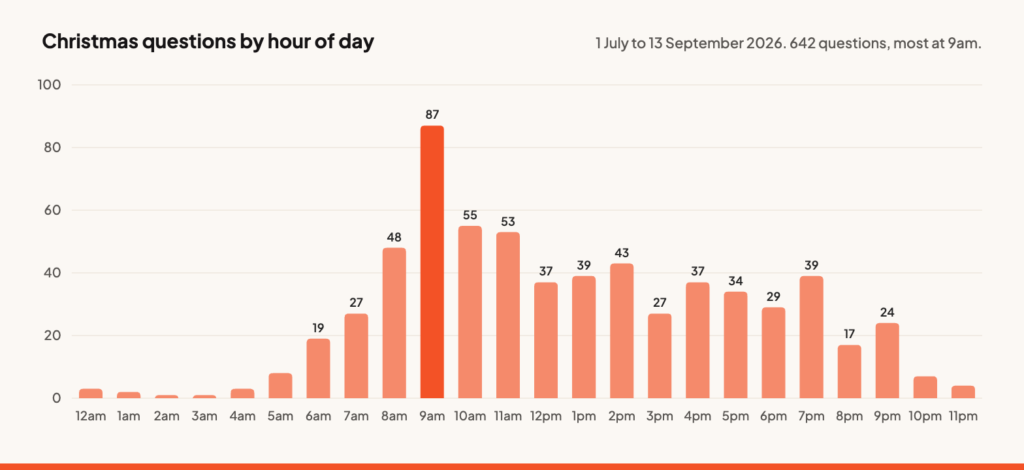
Nine in the morning is the busiest hour, which is probably people settling at a desk and clearing the things they meant to look up last night. The more useful thing the chart shows is that there isn’t an hour without a question. They run steadily through the afternoon and evening, they’re still arriving at eleven at night, and a handful of people were asking about Christmas at four in the morning. Every one of those got an answer, because the assistant doesn’t have opening hours. Your Christmas page can be perfect and still leave someone stuck at eleven o’clock because they couldn’t find the bit they needed, or because their question was one you hadn’t thought to answer.
This is where an assistant on the website earns its keep. Holp reads your pages and answers visitors’ questions in their own words, at any hour, in whatever language they ask in, and it tells you afterwards which questions it couldn’t answer, which is how we know that Christmas has already started. That list of unanswered questions is the best editorial brief you’ll get this season, whether or not you use software to work through it.
A checklist for the next six weeks
- Publish the on-sale date, or an honest “on sale in October” holding line with a mailing list sign-up.
- State the members’ early-access position on both the Christmas page and the membership page.
- Describe the experience as a sequence: what happens, how long it takes, who it suits, indoors or out.
- Put Christmas opening times, last entry and closed days in one place and check every other mention against it.
- Show availability and sold-out dates on the page, with the nearest alternative.
- Write the amendment policy in plain language and link to where bookings are changed.
- State carer, access and dog policies for this event specifically, not the venue in general.
- Build the Christmas FAQ page, date it, and give it an owner.
- Read the enquiries that still arrive each week and fold them back in.
Frequently asked questions
When should our Christmas page go live?
Now, even if it’s a single paragraph. Visitors are already asking, and a page that says “Christmas 2026: tickets on sale in October, full details soon” captures interest and stops the same question arriving by email fifty times. Build it out as the details firm up.
Should Christmas times replace our normal opening times page?
No. Keep the normal page and add a clearly labelled Christmas section, or link prominently to the event page from it. What matters is that the two never contradict each other, so decide which one is the source of truth and make the other refer to it.
How do we handle questions we can’t answer yet?
Say so, and say when you’ll know. “We’ll confirm the grotto times when tickets go on sale in October” is a better answer than silence, and it’s a better answer than a guess you’ll have to correct later.
Is an AI assistant a substitute for a good Christmas page?
No. It answers from what you’ve published, so a thin page gives thin answers. The value is in covering the hours your team isn’t there, handling the thousand ways the same question gets phrased, and showing you which questions your pages don’t yet answer. Get the page right first, then let the assistant carry it round the clock.
Want to see which Christmas questions your website can already answer? Run the free Site Answerability Check, or book a demo and we’ll walk through your site with you.